Picture this: your inbox right now probably contains at least three digital traps. Maybe more. Harmless-looking links pretending they’re from your bank, a delivery service, maybe even your colleague down the hall.
One careless click? That’s all it takes to lose access to your accounts, watch your savings vanish, or have ransomware hold your business files hostage. The internet’s turned into a minefield, frankly. And the people setting these traps keep getting better at their craft.
So when we tell you to scan the URL before visiting every site, we’re being realistic. What follows is your practical roadmap: how to identify threats, leverage no-cost verification tools, and shield yourself before things go sideways.
The Rising Threat of Malicious URLs
Let’s talk numbers, because they paint a grim picture you need to see. Nearly half a billion digital threats just sitting in corporate inboxes. Phishing makes up roughly a third of all cyberattacks, and the people behind these schemes aren’t amateurs anymore.
They’re weaponizing artificial intelligence to write emails you’d swear came from FedEx or your CFO. Fake websites now replicate legitimate brands with pixel-perfect accuracy. Your gut feeling? It won’t cut it anymore when forgeries look this convincing.
Clicking the wrong link can have serious consequences. Ransomware can encrypt all your family photos, demanding Bitcoin for release, while credential-harvesting pages steal usernames and passwords by mimicking legitimate bank login screens.
Email compromise attacks can trick your accounting team into wiring large sums to criminals overseas. Even smartphones aren’t safe, as malicious URLs exploit mobile vulnerabilities just like desktops. To prevent these threats, always scan URL before clicking to ensure the link is safe and trustworthy.
Critical Red Flags in Suspicious URLs
Recognizing danger before it bites gives you the upper hand. Here’s what threatening URLs actually look like when you know where to look.
Domain Name Manipulation Techniques
Typosquatting is the attacker’s favorite parlor trick, they’ll register “g00gle.com” with zeros instead of the letter “o.” Did you even notice the difference? Homograph attacks get sneakier by using Cyrillic or Greek letters that appear visually identical to Latin characters.
Watch for subdomain manipulation too, like “apple-support.random-sketchy-domain.net.” The familiar brand name sits right there, deliberately placed to fool your quick glance. URL shorteners completely mask the actual destination. None of this happens by accident, it’s engineered deception.
Technical Indicators of Dangerous Links
Stop trusting HTTPS blindly. Bad actors purchase SSL certificates for their fraudulent sites constantly. When you spot bare IP addresses where a proper domain name should be, alarm bells should ring.
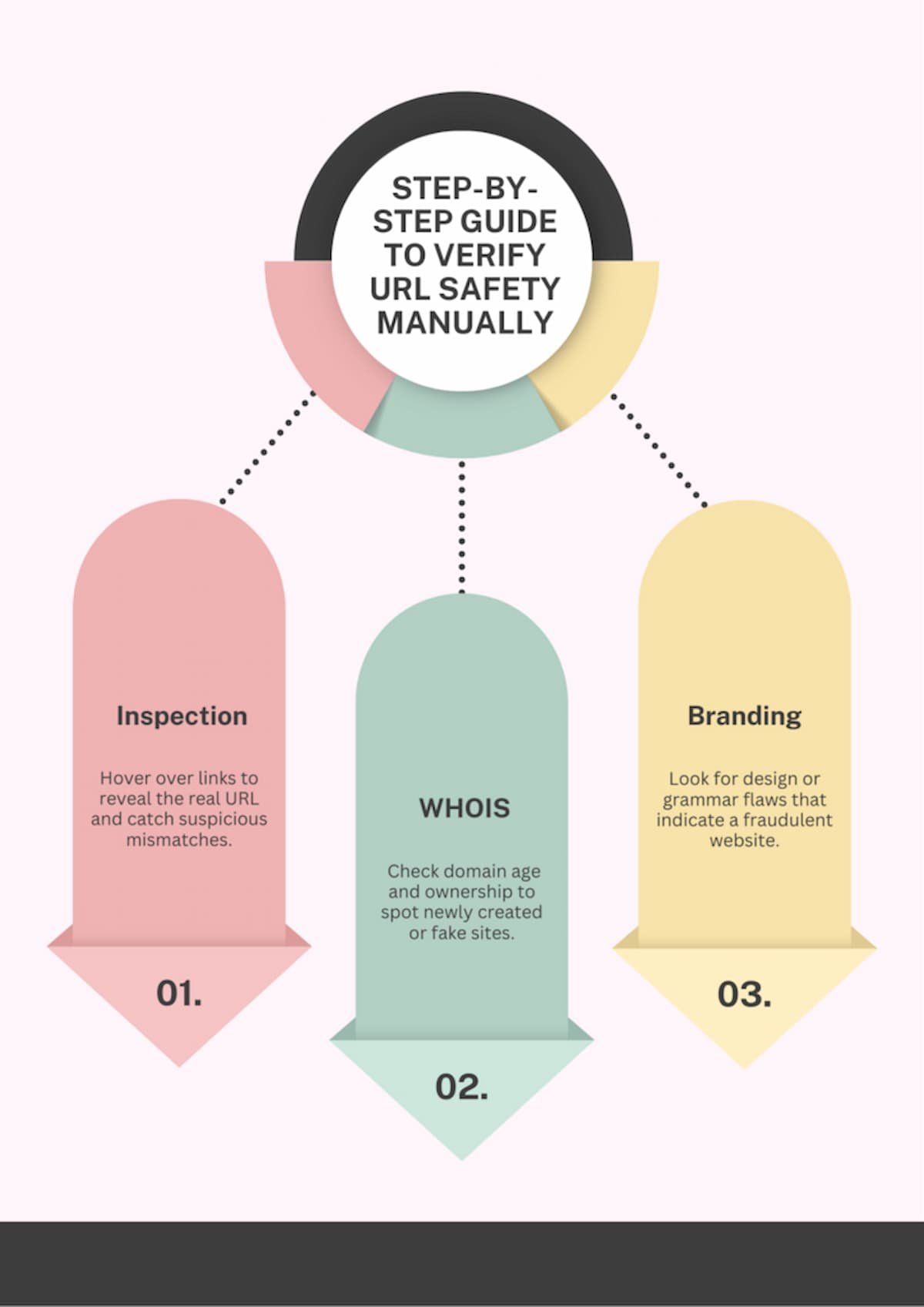
Step-by-Step Guide to Verify URL Safety Manually
Tools are fantastic, but sometimes you need human verification. Here’s how to verify URL authenticity using your own judgment.
Pre-Click URL Inspection Techniques
Here’s a simple trick: hover your cursor over any link without actually clicking it, the true destination pops up in your browser’s lower-left corner. When the visible text claims “chase.com” but hovering reveals “ch4se-security.ru,” you’ve just caught a fraud attempt in action.
Right-click any suspicious link and copy it, then paste into a plain text editor for careful examination. Hunt for weird parameters, unusual characters, or subtle spelling variations. Run a WHOIS lookup to discover when the domain was created, brand-new domains hosting “established” companies should immediately trigger suspicion.
Domain Reputation and Age Verification
Archive.org’s Wayback Machine shows whether a website existed years ago or popped up last Tuesday. Legitimate businesses have digital history; scam sites don’t. SSL certificates contain organizational validation details, click that padlock icon in your address bar and inspect what’s behind it.
Use WHOIS databases to identify the actual domain owner. Does “microsoft-security-update.com” genuinely belong to Microsoft? Unlikely if registration shows “Pavel Whoever” in a random jurisdiction with no corporate connection.
Content Authenticity and Branding Clues Evaluate the quality of the page once opened, poor grammar, low-resolution logos, or mismatched branding are strong indicators of fraudulent intent. Cross-check brand identities by comparing slogans, tone of voice, and design elements against an official site. Scammers frequently skip these subtle details, making visual inconsistencies your first warning sign.
Safe Browsing Tips for Different Platforms
Your laptop requires different protection than your tablet. Each platform needs customized safe browsing tips for effective security.
Desktop Browser Security Best Practices
Install browser updates the instant they become available, those aren’t feature additions, they’re security patches closing exploitable gaps. Configure aggressive privacy settings that block third-party cookies and disable tracking.
Turn on warnings for suspicious downloads and dangerous sites. Flush your browsing history and cookies at least weekly to eliminate accumulated tracking data. Run questionable pages in sandbox mode, which isolates them from your actual system.
Mobile Device URL Safety Protocols
Mobile apps handle links differently from mobile browsers, sometimes completely bypassing built-in safety mechanisms. QR codes are just URLs in graphic form, only scan them from sources you genuinely trust.
Many phone cameras now preview the URL before opening it, giving you a chance to evaluate before committing. Consider installing mobile-specific URL scanning applications if you regularly receive links through SMS or messaging platforms.
Industry-Specific URL Security Considerations
Different industries face specialized threats requiring tailored defenses. Detecting malicious websites matters universally, but certain sectors need heightened awareness.
E-commerce and Online Shopping Protection
Always verify the precise URL of checkout pages before entering payment information. Scammers build perfect replicas of popular online stores. Look past HTTPS—investigate customer reviews, verify business registration, confirm contact details actually work.
Legitimate marketplace platforms like Amazon display verification badges for authentic sellers. When prices seem impossibly low, the website’s almost certainly fraudulent.
Financial Services and Banking Security
Your bank will absolutely never email you requesting account verification through an embedded link. Never. Manually type your bank’s URL directly into the address bar instead of trusting email links.
Investment fraud schemes promise guaranteed returns through websites that look suspiciously amateur. Multi-factor authentication provides essential protection, but sophisticated fake banking portals can still capture your primary credentials when you log in.
Building a Comprehensive URL Security Strategy
Individual caution helps, but systematic approaches work dramatically better. Building structured defenses protects everyone you care about.
Personal Digital Hygiene Checklist
Verify URLs before clicking, particularly in emails and chat messages. Deploy a password manager that actively warns about phishing attempts. Keep every device and application updated without procrastination.
Maintain current backups of critical files so ransomware loses its leverage over you. Follow reputable security blogs to learn about emerging threat patterns as they develop.
Family and Home Network Protection
Configure parental controls with URL filtering on devices your kids use. Establish a separate guest network for visitors, isolating them from your primary network if their device gets compromised.
Update your router’s firmware regularly, networking equipment needs security patches just like computers. Teach children and older relatives basic URL safety principles appropriate to their comfort level with technology.
Taking Control of Your Digital Safety
Check website safety stopped being optional the moment cybercrime became industrialized. You’ve now got the warning signs memorized, free verification tools bookmarked, and manual checking techniques down. Cybercriminals will keep refining their methods, but you’re prepared to counter them.
Take action immediately: install a URL scanner extension today, practice hover-before-click religiously, and teach these safe browsing tips to everyone in your circle. Your personal vigilance does more than protect just you, it strengthens the entire internet ecosystem when fewer people fall victim and more threats get reported to security databases.
Your Pressing URL Security Questions Answered
What happens if I accidentally click a malicious URL?
Immediately disconnect from the internet to halt any ongoing data transmission. Execute a complete antivirus scan. Change passwords for every account you accessed afterward, particularly if you entered login credentials. Watch your bank statements carefully for unauthorized transactions.
How can I tell if a shortened URL is safe?
Deploy URL expansion services like CheckShortURL or GetLinkInfo to expose the complete destination before clicking. Numerous browser extensions automatically expand shortened links for inspection. When you share links, stick with reputable shorteners like bit.ly that offer built-in preview capabilities.
Can antivirus software scan URLs before visiting?
Contemporary antivirus solutions include live URL scanning that evaluates links as you click them. They work directly with your browser to block known malicious destinations automatically. However, brand-new threats might slip through initially, so combine antivirus protection with manual inspection habits and dedicated URL verification tools.