

Growing businesses often outgrow spreadsheets, emails, and scattered communication tools as projects become more complex. SaaS project management platforms help teams organize tasks, improve collaboration, track progress, and manage workflows from a single cloud-based workspace.
With the rise of remote teams, automation, and AI-powered features, modern project management tools now offer smarter ways to plan projects, reduce manual work, and improve productivity. However, choosing the right platform requires more than looking at features or pricing alone.
In this comparison, we evaluated leading SaaS project management tools based on usability, features, automation, integrations, security, scalability, pricing value, and suitability for growing businesses. The goal is to help you find a platform that matches your team’s needs and supports long-term growth.
Editorial Disclosure
This resource was independently researched and compiled using publicly available information from software websites, comparison pages, user reviews, industry resources, and SaaS research sources. No software provider paid for inclusion or influenced the rankings. The recommendations are based on factors such as features, usability, pricing, integrations, scalability, security, and overall value. This guide is intended to help readers make informed decisions and does not represent an endorsement of any specific SaaS product.
Key Takeaways
- Choose a SaaS project management tool based on your team’s workflow and future growth, not just its popularity.
- Prioritize ease of use, scalability, integrations, and automation when comparing platforms.
- AI-powered features can improve productivity, but they should complement—not replace—effective project management practices.
- Consider the total cost of ownership, including premium features, user limits, and upgrade costs.
- The best software is the one that fits your business needs today while remaining flexible enough to support future expansion.
For companies comparing SaaS tools for small business, the right platform should provide more than basic task tracking. It should be easy to adopt, reasonably priced, and capable of supporting automation, collaboration, and reporting as the team expands. The following comparison highlights how the leading platforms differ in value, usability, scalability and overall suitability.
Selection Process
We considered a broad range of SaaS project management platforms before selecting the final five. Asana, ClickUp, monday.com, Jira and Trello were chosen because they offer the strongest overall combination of usability, features, automation, integrations, scalability, security and pricing value. Together, they also represent different business needs, from simple task management and visual workflows to cross-functional planning and Agile software development.
Wrike, Smartsheet, Basecamp, Zoho Projects and Notion were also evaluated but did not make the final list. Wrike and Smartsheet are strong options for enterprise and highly structured work management but can be more complex or expensive for growing businesses. Basecamp prioritizes simplicity but lacks some advanced reporting, automation, and portfolio capabilities. Zoho Projects offers good value, particularly for companies already using the Zoho ecosystem, while Notion is better suited to knowledge management and flexible team workspaces than comprehensive project management. Their exclusion does not mean they are poor products; they may be better suited to more specific requirements.
Quick Comparison: Best SaaS Project Management Tools
| Rank | 🧩 Software | 👥 Best Suited To | 🚀 Standout Capability | 💰 Pricing at a Glance | ⚠️ Notable Limitation | ⭐ Rating |
| #1 | Asana | Growing cross-functional teams | Balanced planning, automation, and portfolio visibility | Free plan available; Starter from $10.99/user/month annually | Advanced portfolio and workload tools require a higher tier | ⭐⭐⭐⭐⭐ 9.1/10 |
| #2 | ClickUp | Startups, agencies and feature-heavy teams | Tasks, documents, time tracking and AI in one platform | Free plan available; Unlimited from $7/user/month annually | Feature-rich interface can feel overwhelming | ⭐⭐⭐⭐⭐ 9.0/10 |
| #3 | monday.com | Marketing, operations and process-driven teams | Highly visual and customisable workflows | Free for two users; paid plans from approximately $9/seat/month annually | Costs increase with seat bundles and add-ons | ⭐⭐⭐⭐☆ 8.8/10 |
| #4 | Jira | Software development and technical product teams | Advanced Agile planning and issue tracking | Free for up to 10 users; Standard from $7.91/user/month | Steeper learning curve for non-technical users | ⭐⭐⭐⭐☆ 8.7/10 |
| #5 | Trello | Small teams and simple workflows | Fast and intuitive Kanban boards | Free plan available; Standard from $5/user/month annually | Limited advanced reporting and portfolio features | ⭐⭐⭐⭐☆ 8.2/10 |
Editorial Recommendation: Asana stands out for its balance of usability, scalability, and structured project management. ClickUp offers strong value for teams looking for extensive features and customization, while Jira remains a leading choice for software development teams with Agile workflows.
💡 Pricing Note: Pricing may vary depending on billing cycle, region, taxes, number of users, and optional features such as AI capabilities. Always verify the latest pricing details directly with the provider before making a purchase decision.
Why These Five Tools Were Selected
These five platforms were selected because they represent the strongest options across the main needs of growing businesses: ease of use, feature depth, automation, integrations, scalability, pricing value, and specialized project workflows. They also cover distinct use cases, from Trello’s simple task management and Jira’s Agile development capabilities to Asana’s cross-functional planning, ClickUp’s all-in-one functionality and monday.com’s customizable workflows.
Wrike, Smartsheet, Basecamp, Zoho Projects and Notion were also considered. However, they were not included in the final five because they offered less overall value for the specific comparison criteria or served narrower requirements. Wrike and Smartsheet are strong for enterprise and structured work management, Basecamp prioritizes simplicity over advanced reporting, Zoho Projects is most compelling within the Zoho ecosystem, and Notion is better positioned as a flexible knowledge and workspace platform than a complete project-management solution. Their exclusion does not mean they are unsuitable; each may be a better choice for particular teams.
The Best SaaS Project Management Tools
1. Asana
Overview
Asana was founded in 2008 by Dustin Moskovitz and Justin Rosenstein, both former Facebook employees. It has developed into a widely adopted work management platform designed to coordinate tasks, projects, goals and cross-department initiatives.
The platform supports list, board, calendar, timeline and Gantt-style project views. Teams can organize work through tasks, subtasks, dependencies, milestones, custom fields, forms and reusable templates. Managers can use dashboards, portfolios and workload tools to understand progress across multiple projects.
Asana primarily targets business teams rather than a single technical discipline. Marketing, operations, product, creative, HR and professional services teams can configure it without building highly technical workflows. Its main differentiator is the way it combines structured project management with an interface that remains relatively accessible to ordinary business users.
The platform has also expanded its automation and AI capabilities. Asana Rules can move tasks, update fields and trigger routine actions. AI Studio lets organizations create AI-supported workflows, while other AI functions can summarise work, assist with status updates and help users find relevant information.
Asana occupies a valuable middle ground. It is more structured and scalable than Trello but generally easier for non-technical teams to adopt than Jira. It also requires less initial configuration than ClickUp or monday.com in many common business use cases.
Key Features
- Tasks, subtasks, dependencies, recurring tasks and milestones
- List, Kanban board, calendar, timeline and Gantt views
- Project templates, forms and custom fields
- Rules-based workflow automation
- Reporting dashboards and project status updates
- Portfolios, goals and workload management on higher plans
- Approvals, proofing and native time tracking on eligible plans
- AI Studio and AI-assisted summaries, updates and workflows
- Mobile applications and guest collaboration
- More than 100 supported integrations
Pros
- Clean and consistent interface across different project views
- Strong balance between simplicity and advanced project control
- Effective portfolio, goal and workload features for growing teams
- Unlimited automations are included in the Starter plan
- Suitable for technical and non-technical departments
- Large integration ecosystem and useful external guest access
Cons
- Portfolio, workload and goal management require the Advanced plan
- Advanced costs can become significant for larger teams
- Native time tracking is not available on lower tiers
- The number of notifications can become distracting without careful settings
- Complex Agile software development workflows are better handled by Jira
Pricing
Asana offers a Personal plan for individuals and very small teams. The Starter plan costs $10.99 per user per month when billed annually, or $13.49 when billed monthly. It includes timeline and Gantt views, forms, dashboards, custom fields, and unlimited automations.
The Advanced plan costs $24.99 per user per month annually, or $30.49 monthly. It adds portfolios, goals, workload, approvals, proofing, time tracking, and more extensive reporting capabilities. Enterprise plans use custom pricing and add controls such as SAML authentication and SCIM provisioning.
Starter offers reasonable value for teams that need structured project planning. Advanced is more appropriate when management needs organization-wide capacity, portfolio, and strategic-goal visibility. Current plan details are available on the official Asana pricing page.
Integrations
Asana supports integrations with Slack, Microsoft Teams, Google Drive, Gmail, Google Calendar, Salesforce, Tableau, Power BI, Zoom, Zapier, OneDrive, SharePoint, GitHub and many other business applications. Its official integration directory is extensive enough for most growing organizations.
Ease of Use
Asana is one of the more approachable full-scale project management platforms. New users can understand tasks, projects and assignees quickly, while templates reduce setup work.
Portfolios, workload planning, advanced custom fields, and automated workflows require more training. However, the learning curve is generally more manageable than ClickUp’s or Jira’s. Businesses should define naming conventions and project ownership early to prevent duplicated projects and inconsistent reporting.
Security & Reliability
Asana provides two-factor authentication and permissions appropriate for everyday team collaboration. Enterprise plans add SAML-based single sign-on, SCIM provisioning, advanced administration, and data residency options.
The company reports SOC 2 Type 2, ISO/IEC 27001, ISO/IEC 27017, ISO/IEC 27018 and ISO/IEC 27701 coverage, alongside GDPR-related controls. These claims can be verified through the Asana Trust Center. Organizations with regulated or sensitive data should still confirm whether the required controls are included in their selected plan.
Best For
Asana is best suited to growing businesses that need one system for marketing, operations, product launches, client delivery and other cross-functional projects. It is especially suitable for teams that want stronger reporting and coordination without adopting a developer-focused platform.
Businesses should avoid it if advanced time, billing, and financial management must be included at a low price, or if software development is the company’s dominant use case.
Best Alternative
Choose ClickUp instead if you need native time tracking, built-in documents and more features at a lower starting price.
Editor’s Take
Asana’s greatest strength is not that it provides the largest number of features. ClickUp offers more functions in one workspace, while Jira delivers substantially deeper software development controls. Asana performs well because its core features are arranged around a coherent work-management model that ordinary employees can understand.
That distinction matters during growth. A feature-rich system provides little value if only administrators know how to use it. In Asana, departments can begin with task lists and boards before adopting dependencies, forms, dashboards, goals and portfolios as their processes mature.
The main concern is the price jump between Starter and Advanced. Businesses often discover that workload planning, portfolios and strategic goal tracking are the capabilities management wants most after the initial rollout. A growing team should therefore calculate the likely Advanced cost before committing, even if Starter meets its immediate requirements.
Compared with monday.com, Asana is less visually configurable but often produces more consistent project structures. Compared with ClickUp, it sacrifices some feature density for clarity. It is the strongest overall recommendation for a growing organization that values broad adoption, dependable project structure, and cross-functional visibility.
Ratings
- Features: 9.2/10
- Ease of Use: 9.2/10
- Pricing Value: 8.3/10
- Integrations: 9.3/10
- Automation: 9.2/10
- Security: 9.3/10
- Scalability: 9.4/10
- Overall Score: 9.1/10
2. ClickUp
Overview
ClickUp was founded in 2017 with the ambition of consolidating workplace applications into one productivity platform. It has expanded rapidly and now combines project management, task tracking, documents, whiteboards, chat, goals, dashboards, time tracking and artificial intelligence.
Its project management structure is based on Workspaces, Spaces, Folders, Lists, tasks and subtasks. Businesses can create custom statuses and fields, manage dependencies, estimate work, record time and view projects through boards, lists, calendars, Gantt charts, timelines and workload displays.
ClickUp’s main differentiator is feature breadth. A business may be able to replace separate task, documentation, whiteboard, time-tracking and internal communication tools. Its ClickUp Brain products add AI assistance, writing, enterprise search, summaries and agent-based automation.
This breadth makes ClickUp attractive to startups, agencies, remote teams and cost-conscious growing companies. It can support straightforward task lists as well as complicated operational processes.
The same flexibility creates its main weakness. Teams face numerous settings, views, and hierarchy decisions. Without controlled implementation, different departments can build inconsistent structures and make the workspace difficult to understand.
Key Features
- Tasks, subtasks, checklists, dependencies and recurring work
- Multiple project views, including list, board, calendar and Gantt
- Goals, portfolios and resource management
- Dashboards, workload views and reporting
- Documents, whiteboards, forms, chat and video recording
- Native time estimates and time tracking
- Custom fields, statuses and task types
- Workflow automations and automation integrations
- ClickUp Brain, AI agents and workspace search
- Templates and migration tools for competing platforms
Pros
- Exceptionally broad functionality at competitive entry-level prices
- Unlimited plan includes Gantt charts, storage, custom fields and integrations
- Native time tracking is useful for agencies and service businesses
- Strong AI options for teams prepared to pay for them
- Extensive customization across workflows and project views
- Can replace several separate workplace applications
Cons
- Dense interface can overwhelm new and occasional users
- Extensive customization increases administrative requirements
- Important AI capabilities require separate per-user charges
- Performance may feel inconsistent in very large or heavily customized workspaces
- Businesses must upgrade the entire workspace rather than selected individual users
Pricing
ClickUp’s Free Forever plan includes unlimited tasks and members, collaborative documents, Kanban boards, sprint management and basic security.
The Unlimited plan costs $7 per user per month when billed annually. It adds unlimited storage, integrations, Gantt charts, forms, custom fields, native time tracking, goals, portfolio management and resource management.
Business costs $12 per user per month annually and adds more advanced dashboards, automation allowances, timeline views, workload tools, Google SSO and sprint reporting. Enterprise pricing is customized.
AI is priced separately. ClickUp currently lists Brain AI at $9 per user per month and a broader Everything AI package at $28 per user per month, with credit allowances applying to certain agentic and automated functions. The ClickUp pricing page should be checked carefully because AI usage and workspace-wide billing can materially change the total cost.
Integrations
ClickUp connects with Slack, Microsoft Teams, Google Drive, OneDrive, Dropbox, GitHub, GitLab, Bitbucket, Google Calendar, Outlook, Zoom, HubSpot, Zapier, Tableau, Figma and numerous time-tracking applications. The ClickUp integrations directory also includes import options for Asana, Trello, Jira, monday.com and Wrike.
Ease of Use
Basic tasks and lists are straightforward, but the complete platform requires deliberate onboarding. Managers must decide how Spaces, Folders and Lists will represent departments, clients and projects.
ClickUp works best when an administrator creates a limited set of approved templates, views, and custom fields. Allowing every team to configure the platform independently can create unnecessary complexity.
Security & Reliability
ClickUp supports two-factor authentication on its free plan. Business includes Google SSO, while Enterprise adds SAML SSO, SCIM provisioning, audit logs, session management, granular roles and regional data residency options.
ClickUp reports SOC 2 and ISO 27001 coverage and has also announced ISO 42001 certification for AI management. Its official security page provides further information. Enterprise customers should verify the exact regional hosting, compliance, and contractual options required before purchase.
Best For
ClickUp is best for startups, agencies, remote teams and operationally mature small businesses that want high feature density and are willing to configure the platform carefully.
Businesses should avoid it if they prioritize the simplest possible onboarding, have limited internal administration capacity, or expect occasional users to work comfortably without training.
Best Alternative
Choose Asana instead if ease of adoption, consistent project structures and simpler cross-department management are more important than feature breadth.
Editor’s Take
ClickUp offers the best feature-to-price ratio in this comparison. The Unlimited plan includes several capabilities that competitors reserve for more expensive tiers, including Gantt charts, time tracking, broad integrations and portfolio management.
Its AI strategy is also more ambitious than that of most direct competitors. Teams can use AI across tasks, documents, chat and workspace search, while agent-based tools support more advanced workflows. However, the additional per-user AI price means ClickUp should not automatically be considered the cheapest AI option.
The platform’s central trade-off is between capability and cognitive load. ClickUp gives administrators many ways to model the same business process. That flexibility is helpful for an experienced operations team, but it can generate confusing hierarchies and duplicated dashboards when governance is weak.
ClickUp performs better than Asana for companies wanting an all-in-one environment with built-in documents, time tracking and communication. Asana remains easier to standardize across departments. ClickUp is therefore the better value choice for a company prepared to invest in setup, training and workspace governance.
Ratings
- Features: 9.6/10
- Ease of Use: 8.1/10
- Pricing Value: 9.4/10
- Integrations: 9.2/10
- Automation: 9.4/10
- Security: 9.0/10
- Scalability: 9.1/10
- Overall Score: 9.0/10
3. monday.com
Overview
monday.com began as an internal work-management tool and developed into a configurable cloud platform covering project management, sales, development, service operations and broader business workflows.
Its core work-management product uses boards, groups, items, subitems and columns. Teams can display work through table, Kanban, calendar, timeline, Gantt, chart and workload views. The color-coded interface makes responsibilities, statuses and deadlines easy to identify.
The platform is particularly strong when a company needs to model a process rather than simply maintain a task list. Marketing campaigns, content calendars, recruitment pipelines, client onboarding, procurement requests and operational workflows can all be built using custom columns, forms, automations and dashboards.
monday.com has expanded its AI offering with Sidekick, AI-powered columns, meeting notes, agents and a no-code application builder. AI access and credit allowances vary by plan.
The platform targets small businesses through to large enterprises. It is easier to approach visually than Jira and can be more adaptable than Asana. However, its pricing structure, seat bundles, automation allowances and dashboard limits require careful evaluation.
Key Features
- Customizable boards, groups, items and subitems
- Kanban, calendar, timeline, Gantt and workload views
- Forms, templates, files and collaborative workdocs
- Cross-board dashboards and reporting
- Time tracking on eligible plans
- Formula, dependency and custom field capabilities
- Rules-based automations and integration actions
- AI Sidekick, AI columns, meeting notes and agents
- Product-specific options for work management, development and service
- Guest and viewer access controls
Pros
- Highly visual and adaptable interface
- Excellent for repeatable business and operational processes
- Large selection of templates
- Strong dashboards and cross-board reporting on higher plans
- Useful automation builder for non-technical teams
- Broad integrations for marketing, sales, operations and development
Cons
- Seat bundles can make small-team pricing less predictable
- Automation, integration and dashboard limits vary significantly by plan
- Advanced reporting and time tracking require higher tiers
- Extensive board customization can produce inconsistent data structures
- AI credit usage requires monitoring
Pricing
monday.com offers a limited free plan for up to two users. Paid prices vary by region and billing configuration. The company’s work-management pricing commonly starts with Basic, followed by Standard, Pro and custom-priced Enterprise tiers.
At the time of review, monday.com displayed Basic from approximately $9 per seat per month, Standard from $12 and Pro from $19 when billed annually in supported US pricing views. Local currency, seat bundles and promotional AI credits can affect the final amount.
Standard is generally the practical minimum for teams needing timeline or Gantt views, guest access, automations and integrations. Pro is more suitable for time tracking, formulas, private boards and larger automation allowances. Businesses should model their actual seat count and expected automation volume using the official monday.com pricing page.
Integrations
monday.com connects with Slack, Outlook, Microsoft Teams, Google Drive, Google Calendar, Gmail, Salesforce, GitHub, GitLab, Jira, Trello, Asana, Dropbox, OneDrive, Mailchimp and numerous other services. Some integrations are limited to particular plans. The vendor provides details in its integration directory.
Ease of Use
The colorful interface makes simple boards easy to understand, and templates provide a useful starting point. Non-technical teams can build automations without code.
More sophisticated implementations require planning. Board relationships, mirrored columns, permissions, dashboards and automation limits can become difficult to administer at scale. A clear workspace architecture is essential.
Security & Reliability
monday.com provides authentication, permissions and administrative controls across its plans, with more advanced governance, SSO and enterprise controls available at higher levels.
The company lists ISO/IEC 27001, 27017, 27018, 27032 and 27701 certifications, as well as SOC 1 Type II, SOC 2 Type II and SOC 3 reports. It also states that Enterprise customers receive a 99.9% uptime service-level agreement. Details are available through the monday.com Trust Center.
Best For
monday.com is best for marketing departments, agencies, operations teams and businesses with highly visual or process-driven workflows.
It may not be the best option for companies seeking the lowest predictable per-user cost or for development teams requiring the depth of Agile and issue management provided by Jira.
Best Alternative
Choose Asana instead if you prefer a more structured project-management system with predictable workflows across different departments.
Editor’s Take
monday.com is at its best when work does not fit neatly into a conventional project template. Its configurable columns and visual boards allow a business to represent campaigns, approvals, requests, pipelines, and delivery schedules without technical development.
This flexibility differentiates it from Asana. Asana encourages teams to work within a more consistent project-management structure, while monday.com behaves more like a configurable work database. That makes monday.com stronger for tailored operational workflows but also increases the risk of every department creating a different system.
The main buying issue is not the advertised entry price. It is whether the selected tier provides enough automation actions, integrations, dashboard capacity, permissions and AI credits for actual use. A low-priced plan may become restrictive once several departments are connected.
monday.com deserves its third-place position because it provides excellent visual management, automation, and adaptability. It is often the best choice for marketing agencies and operational teams, but Asana is more consistent for general cross-functional project management and ClickUp usually offers greater feature depth per paid seat.
Ratings
- Features: 9.1/10
- Ease of Use: 8.8/10
- Pricing Value: 8.2/10
- Integrations: 9.3/10
- Automation: 9.3/10
- Security: 9.4/10
- Scalability: 9.1/10
- Overall Score: 8.8/10
4. Jira
Overview
Jira is developed by Atlassian, an Australian software company founded in 2002. Originally associated with issue and bug tracking, Jira has expanded into a flexible project management platform for software, product, business and operations teams.
It remains most closely associated with Agile development. Scrum and Kanban boards, backlogs, sprints, epics, releases, dependencies, estimates and development integrations give engineering teams detailed control over work from planning through deployment.
Jira also supports business projects through lists, calendars, timelines, forms and configurable workflows. Dashboards, reports and custom fields allow organizations to measure progress and build processes around different work types.
Automation is included across Jira Cloud plans, although execution allowances vary. Atlassian’s Rovo AI capabilities can help users find information, generate automation rules, summarise work, identify themes and surface project risks.
Jira’s strongest differentiator is its combination of workflow depth, development context and extensibility. Its marketplace contains more than 3,000 integrations and applications. However, configuration terminology and administration remain more demanding than those of general-purpose competitors.
Key Features
- Scrum and Kanban boards
- Backlogs, sprints, epics and release management
- Custom workflows, fields, issue types and permissions
- Lists, calendars, timelines and dashboards
- Agile reports, burndown charts and cycle-time analysis
- No-code automation
- Forms and request intake
- Dependency and capacity management
- Rovo AI search, summaries, insights and automation assistance
- Deep integrations with software development tools
Pros
- Exceptional Agile and issue-management capabilities
- Strong development and DevOps integrations
- Highly configurable workflows and permissions
- Free plan supports up to 10 users
- Extensive marketplace and developer ecosystem
- Strong enterprise administration and security options
Cons
- Steeper learning curve than general-purpose platforms
- Configuration can require a dedicated administrator
- Non-technical users may find its terminology unfamiliar
- Marketplace applications can increase total costs
- Overly customized instances can become difficult to maintain
Pricing
Jira offers a free cloud plan for up to 10 users. It provides basic project functionality and is a strong option for small software teams.
At the time of review, Standard started at $7.91 per user per month, while Premium started at $14.54 per user per month. Pricing can vary according to the number of users and billing configuration. Enterprise pricing is customized.
Premium is designed for teams that need cross-team planning, broader automation, sandbox capabilities, enhanced support and a 99.9% uptime service-level agreement. Organizations should use Atlassian’s calculator on the official Jira pricing page to confirm costs.
Integrations
Jira integrates with GitHub, GitLab, Bitbucket, Jenkins, Slack, Microsoft Teams, Google Drive, Figma, Zoom, Salesforce, Miro and many other platforms. The Atlassian Marketplace offers more than 3,000 applications and integrations, although many third-party applications have separate charges.
Ease of Use
Software teams familiar with Agile concepts can begin quickly using Scrum or Kanban templates. Non-technical users may need assistance understanding work types, workflows, schemes and permissions.
Jira has improved its business-team experience, but Asana, Trello and monday.com remain more welcoming for general users. Good administration is critical because unnecessary workflow states and custom fields can make the platform cumbersome.
Security & Reliability
Jira Cloud supports permissions, data residency and centralized administration. Higher tiers and Atlassian Guard provide options such as SAML single sign-on, automated user provisioning and additional identity controls.
Atlassian maintains SOC 2 reporting and ISO/IEC 27001 certification information through its Trust Center. Customers should confirm which products, plans and deployment models fall within the required compliance scope.
Best For
Jira is the best option for software development, technical product, DevOps and IT teams managing sprints, defects, releases and complicated work dependencies.
It is less suitable for small non-technical teams that only need uncomplicated task tracking, or for companies without the resources to govern a highly configurable system.
Best Alternative
Choose ClickUp instead if you need Agile capabilities but also want an accessible workspace for marketing, operations and other non-technical teams.
Editor’s Take
Jira is the specialist choice in this comparison. It ranks below the three leading general-purpose platforms because the article focuses on growing businesses across multiple functions, not because Jira lacks capability.
For software development, Jira would rank first. Its backlog management, Agile reporting, development integrations and workflow control go considerably further than Trello or Asana. Rovo also gives Atlassian a credible AI layer across search, automation and project insight.
The disadvantage is organizational fit. A marketing or professional services team can use Jira, but it may spend more time configuring terminology and workflows than it would in Asana or monday.com. Jira becomes most valuable when development work, release information and technical dependencies are central to business operations.
Pricing is attractive at the lower levels, especially for teams of ten or fewer. Costs can rise when businesses add marketplace applications, Atlassian Guard or connected products such as Confluence and Jira Service Management. Jira is therefore excellent value for its intended technical audience but less compelling as a universal task manager.
Ratings
- Features: 9.4/10
- Ease of Use: 7.7/10
- Pricing Value: 8.9/10
- Integrations: 9.7/10
- Automation: 9.3/10
- Security: 9.5/10
- Scalability: 9.6/10
- Overall Score: 8.7/10
5. Trello
Overview
Trello was introduced in 2011 and acquired by Atlassian in 2017. It popularised a simple visual approach to task management based on boards, lists and cards.
A board normally represents a project or workflow. Lists represent stages such as planned, in progress and completed, while cards contain tasks, assignees, due dates, checklists, files, comments and custom information. Users move cards between lists as work advances.
Trello’s main purpose is to make work status immediately understandable. Small businesses can launch a board quickly without designing complex workflows or training employees in formal project-management methods.
Built-in automation, previously known as Butler, can move cards, assign members, create recurring actions and trigger responses based on changes. Power-Ups connect boards to external tools and add specialized functions. Premium plans provide additional calendar, timeline, table, dashboard and map views, as well as AI-assisted content functions.
Trello remains one of the most approachable project management products. Its simplicity is an advantage for small teams, but it becomes a limitation when management needs detailed portfolio reporting, resource planning, dependencies or cross-project governance.
Key Features
- Kanban boards, lists and cards
- Due dates, assignees, labels and checklists
- Card mirroring and advanced checklists on paid plans
- Built-in no-code automation
- Templates for common workflows
- Power-Ups and integrations
- Calendar, timeline, table, dashboard and map views on Premium
- AI-assisted card descriptions, comments and brainstorming
- Workspace permissions and administration
- Desktop and mobile applications
Pros
- Very easy to learn and deploy
- Generous free plan for simple workflows
- Clear and engaging visual interface
- Affordable Standard plan
- Useful built-in automation
- Large selection of Power-Ups and templates
Cons
- Limited native portfolio and resource management
- Reporting is basic compared with Asana, monday.com and Jira
- Complicated boards can become crowded
- Dependencies and multi-project planning are limited
- AI and advanced views require Premium
Pricing
Trello’s Free plan includes unlimited cards, up to 10 boards per Workspace, 250 Workspace automation runs per month, unlimited Power-Ups per board and two-factor authentication.
Standard costs $5 per user per month when billed annually, or $6 per user per month. It adds unlimited boards, custom fields, advanced checklists, larger attachments and 1,000 Workspace command runs per month.
Premium costs $10 per user per month annually, or $12.50 monthly. It adds AI, multiple project views, unlimited Workspace automation runs and more administrative controls. Enterprise starts at approximately $17.50 per user per month annually, with the per-user amount depending on scale. Current details appear on the official Trello pricing page.
Integrations
Trello supports more than 200 Power-Ups and connections, including Slack, Google Drive, Microsoft Teams, Salesforce, Jira, Confluence and other business applications. Some third-party Power-Ups require separate subscriptions.
Ease of Use
Trello has the lowest learning curve in this comparison. Most employees understand cards and boards without formal training.
The challenge appears when businesses try to represent numerous projects, reporting relationships, and dependencies using an inherently simple board model. At that point, adopting a more structured platform may be preferable to adding more Power-Ups and automation.
Security & Reliability
Trello includes two-factor authentication and operates within Atlassian’s cloud environment. Enterprise provides organization-wide permissions, SSO and user provisioning through Atlassian Guard Standard, as well as more detailed controls over boards, attachments and Power-Ups.
Atlassian publishes its certifications, audit information and security practices through its Trust Center. Buyers should verify plan-level identity and governance features rather than assuming every Atlassian control is included in every Trello subscription.
Best For
Trello is best for freelancers, small businesses, early-stage startups and departments managing straightforward visual workflows.
It should be avoided as the primary system for large portfolios, complex resource allocation, detailed Agile planning or executive-level cross-project reporting.
Best Alternative
Choose Asana instead if your business needs dependencies, workload management, portfolio reporting, or coordination across multiple projects.
Editor’s Take
Trello earns its position because simple software can be more effective than a technically superior platform that employees resist. For a small team managing content, client requests, hiring, or an uncomplicated production flow, Trello can be operational within an afternoon.
Its free plan is practical, and Standard is the most affordable paid entry in this comparison. Built-in automation and Power-Ups allow teams to extend the platform without abandoning the familiar board experience.
The limitation is structural. As the number of projects, teams and dependencies grows, Trello boards can become isolated information islands. Premium views improve visibility, but they do not fully replace the portfolios, workload controls and reporting depth found in Asana or monday.com.
Trello is a sensible starting point when requirements are modest and ease of use is the main priority. Businesses expecting rapid organizational growth should establish a point at which they will either upgrade their operating model or migrate to a more structured platform.
Ratings
- Features: 7.8/10
- Ease of Use: 9.7/10
- Pricing Value: 9.2/10
- Integrations: 8.8/10
- Automation: 8.4/10
- Security: 8.8/10
- Scalability: 7.2/10
- Overall Score: 8.2/10
How We Evaluated These SaaS Project Management Tools
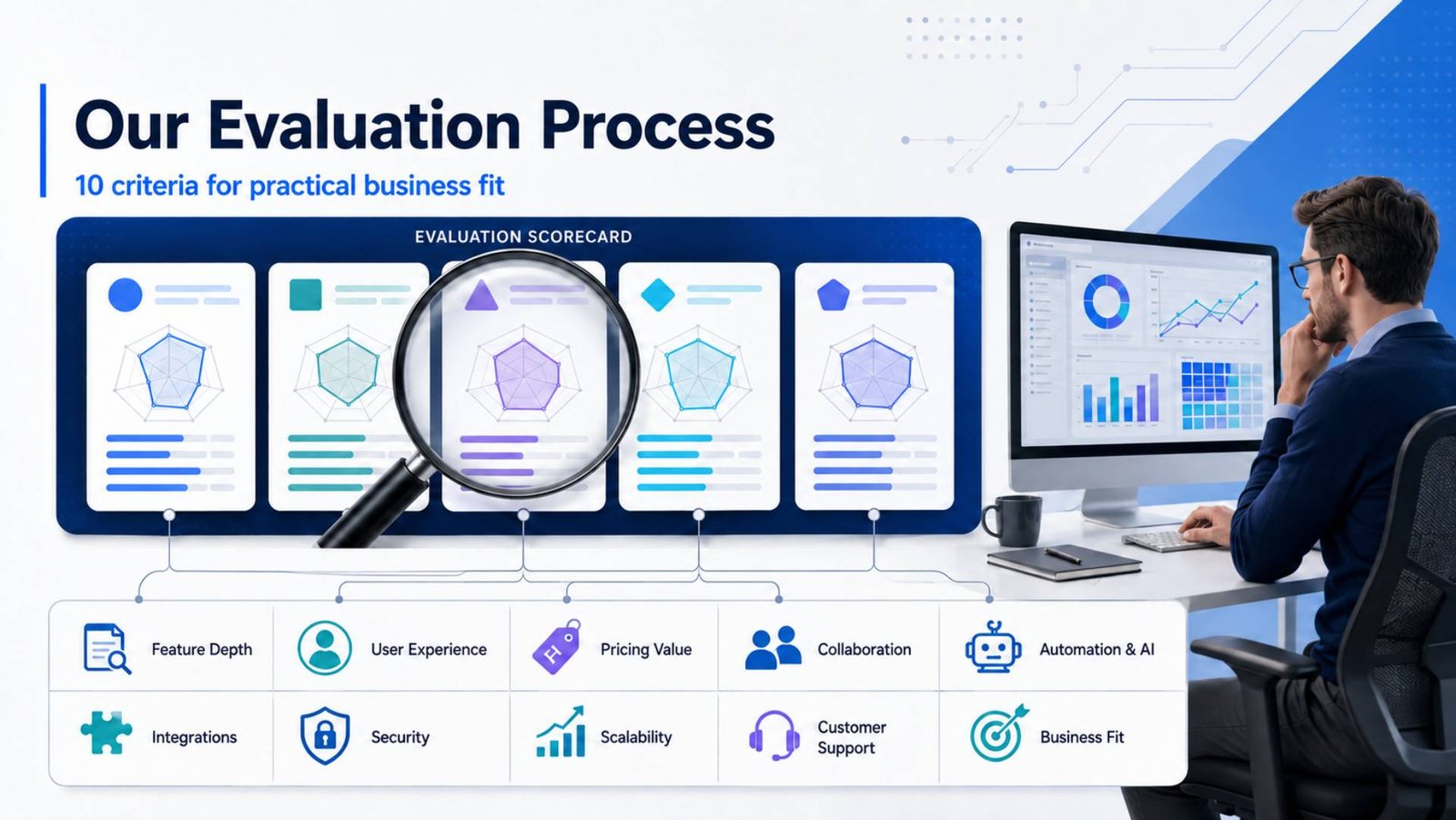
The rankings were based on practical business suitability rather than the number of features listed on vendor websites. Each tool was assessed across the following areas:
Scoring Methodology
Each platform was scored out of 10 across seven criteria reflecting the priorities of growing businesses. The individual scores were multiplied by the weight assigned to each criterion, and the results were combined to calculate the overall score.
| Evaluation Criterion | Weight |
|---|---|
| Features | 20% |
| Ease of Use | 20% |
| Pricing Value | 15% |
| Integrations | 10% |
| Automation and AI | 15% |
| Security | 10% |
| Scalability | 10% |
| Total | 100% |
Features and ease of use received the highest weighting because a platform must provide sufficient functionality while remaining practical for everyday users. Pricing value and automation—including AI capabilities—were also given significant weight because they directly affect productivity and total ownership cost. Integrations, security and scalability completed the assessment by measuring how effectively each platform can connect with existing systems, protect business data and support future growth.
Scores were based on publicly available product information, pricing pages, security documentation, integration directories, independent reviews and suitability for the business use cases covered in this comparison. Ratings reflect the products and pricing available at the time of review and may change as providers update their plans and features.
Feature Depth
We examined task hierarchies, dependencies, milestones, planning views, resource management, time tracking, portfolios, dashboards, forms, templates and reporting.
User Experience
We considered how easily a new team could create projects, understand responsibilities and update work without extensive training.
Pricing and Value
We considered free-plan restrictions, entry-level costs, advanced-plan requirements, AI charges, automation limits, and potential add-on expenses alongside functionality.
Team Collaboration
The evaluation covered comments, files, mentions, guest access, approvals, notifications, documents, and communication features.
Automation and AI
We compared rules-based automation, usage limits, AI summaries, content assistance, natural-language workflow creation, enterprise search and agent-based capabilities.
Integrations
The assessment included widely used communication, productivity, CRM, file storage and development platforms, as well as application marketplaces and APIs.
Security and Reliability
Authentication, permissions, identity management, audit capabilities, data residency and vendor-published compliance information were reviewed. Security suitability ultimately depends on the selected plan and the buyer’s regulatory obligations.
Scalability
We considered whether a platform could progress from basic task management to multi-team reporting, workload planning, portfolio oversight and enterprise administration.
Customer Support
Available documentation, community resources, support channels, onboarding options, enterprise support and service-level commitments were considered.
Business Suitability
Final scores reflect how well each product addresses a defined business situation. A lower overall ranking does not mean a product is inferior for every user. Jira, for example, is the leading recommendation for software development despite placing fourth overall.
Which SaaS Project Management Tool Is Right for You?
Small Business: Trello
Trello is the most practical choice for a small business with straightforward tasks and limited administrative resources. It is easy to introduce, its free plan is useful and the Standard tier remains affordable. Choose Asana instead if the business already needs dependencies, dashboards and several coordinated projects.
Startup: ClickUp
ClickUp gives startups tasks, documents, whiteboards, dashboards, time tracking and collaboration in one environment. Its competitive paid plans may reduce the need for multiple subscriptions. Startups should still appoint an owner to control workspace configuration.
Growing Team: Asana
Asana provides the most balanced path from team-level task management to cross-department portfolios, goals and workload planning. It is suitable for growing organisations that need consistent processes without imposing an excessive learning curve.
Enterprise Company: Asana
Asana is the strongest general enterprise choice in this comparison because it supports company goals, portfolios, workload management, administration and cross-functional adoption. Jira may be superior for development-led enterprises, while monday.com can be stronger for highly customized operational processes.
Marketing Agency: monday.com
monday.com is particularly effective for campaign calendars, creative production, client onboarding, approvals and repeatable service workflows. Its visual dashboards help agencies communicate project status, although seat and automation costs require careful modelling.
Software Development Team: Jira
Jira is the clear recommendation for software development. Its backlogs, sprints, epics, release management, Agile reports and development integrations provide more technical depth than the general-purpose alternatives.
Remote Team: ClickUp
ClickUp’s combination of tasks, documents, whiteboards, chat, clips and AI search helps remote teams keep work and context together. Asana is the better alternative when the organization values a cleaner, more controlled project structure.
FAQs
What is SaaS project management software?
SaaS project management software is a cloud-based platform used to plan, assign, track and report on work. Users access it through a web browser or application, while the provider manages hosting and product updates. Common features include task management, collaboration, dashboards, automation, files, permissions and integrations.
Which project management tool is best overall?
Asana is the best overall option for most growing businesses because it combines strong planning, collaboration, automation and reporting with a relatively manageable learning curve. ClickUp may offer better value for feature-heavy teams, while Jira is more suitable for software development.
Are free project management tools enough for a business?
Free tools can be sufficient for small teams managing uncomplicated workflows. They usually become restrictive when a company needs advanced permissions, Gantt charts, workload planning, portfolio reporting, higher automation limits or enterprise identity management. Businesses should evaluate the cost of upgrading before building critical processes on a free plan.
Which project management tool is best for startups?
ClickUp is the strongest startup choice because its affordable plans combine project management, documents, time tracking, dashboards and collaboration. Trello is better for very small startups requiring only basic visual task management, while Asana is preferable when rapid cross-department growth is expected.
Which project management tool has the best automation?
ClickUp and monday.com provide extensive workflow automation, while Asana offers an especially accessible rules system and unlimited automations on its Starter plan. Jira has excellent automation for technical processes. The best option depends on execution limits, integrations, and the complexity of the workflow being automated.
Which project management tool has the best AI features?
ClickUp currently offers the broadest dedicated AI environment among these five, including AI assistance, enterprise search, multiple language models and agents. Asana’s AI Studio is particularly useful for structured business workflows, while Jira’s Rovo capabilities are valuable for technical knowledge, automation and project insights.
Is SaaS project management software secure?
Reputable SaaS project management platforms provide encryption, authentication, permissions and monitored cloud infrastructure. Enterprise plans may add SSO, SCIM provisioning, audit logs and data residency. Buyers should verify the provider’s current certifications and confirm that required controls are included in the selected subscription.
How much does project management software cost?
Entry-level plans commonly range from approximately $5 to $12 per user per month when billed annually. Advanced plans may exceed $20 per user per month, while enterprise pricing is usually customized. AI packages, marketplace applications, automation usage and minimum seat bundles can increase the total cost.
Which project management tool is easiest to use?
Trello is the easiest tool for beginners because its board, list and card model is immediately understandable. Asana is the easiest among the more comprehensive project-management platforms. ClickUp, monday.com and Jira require greater planning when workflows become complex.
What should a growing business test before purchasing?
A growing business should test project creation, task assignment, reporting, permissions, mobile use, guest access, automation and integrations. It should also calculate the cost at its expected team size and confirm which tier includes workload management, time tracking, AI and security controls.
Final Verdict
The overall ranking is:
- Asana — Best overall for growing cross-functional businesses
- ClickUp — Best for features, value and AI functionality
- monday.com — Best for visual and customized business workflows
- Jira — Best for software development teams
- Trello — Best for simple, affordable task management
Asana earns first place because it provides the strongest overall balance of project structure, usability, automation, integrations, security and scalability. It can support several departments without forcing every user to understand a complicated technical configuration.
ClickUp is the best value option for businesses that want an extensive feature set, although its AI packages and workspace-wide billing must be included in cost calculations. Trello offers the most approachable free experience, while ClickUp has the most extensive dedicated AI offering. Jira is the strongest specialist platform for software teams and technically focused enterprises. Trello remains the best choice for small businesses with uncomplicated projects.
Before purchasing, businesses should run a structured trial using one genuine project. Include managers, administrators and everyday users in the test. Measure how easily the team can create work, find information, report progress and maintain consistent processes. The best project management platform is not necessarily the one with the longest feature list; it is the one employees will use correctly as the organization grows.
Published: July 29, 2026
Last reviewed: July 29, 2026
Next scheduled review: October 2026
Pricing and features were checked against official provider information on the review date.