Introduction
We’ve all experienced the thrill of striping a drive down the virtual fairway or sinking a crucial putt on a simulated course. Indoor golf simulators have become an indispensable tool for golfers seeking to practice, improve, and even compete year-round. But as we watch the ball fly across the screen, a common question arises: how accurately do these digital outcomes reflect our real-world game?
Understanding the true capabilities and limitations of golf simulators is vital. It allows us to maximize our practice sessions and translate indoor improvements to lower scores on the course. We need to know what the numbers mean, how they are generated, and why they might sometimes feel different from outdoor play.
In this comprehensive guide, we will unpack the complexities of golf simulator outcomes. We will explore what “accuracy” truly means for distance measurements, distinguish between measured data and modeled results, and examine how different clubs perform indoors. We’ll also dive into the various factors that influence simulator precision, from ball type and spin capture to environmental setup. By the end, you’ll have a clear understanding of how to leverage simulator data for effective club gapping, swing improvements, and ultimately, a better golf game. For instance, advanced systems providing detailed insights into Foresight training outcomes can significantly enhance a golfer’s understanding of their performance. We aim to equip you with the knowledge to trust your indoor practice and see tangible results where it matters most: on the golf course.
Defining Accuracy in Indoor Golf Training
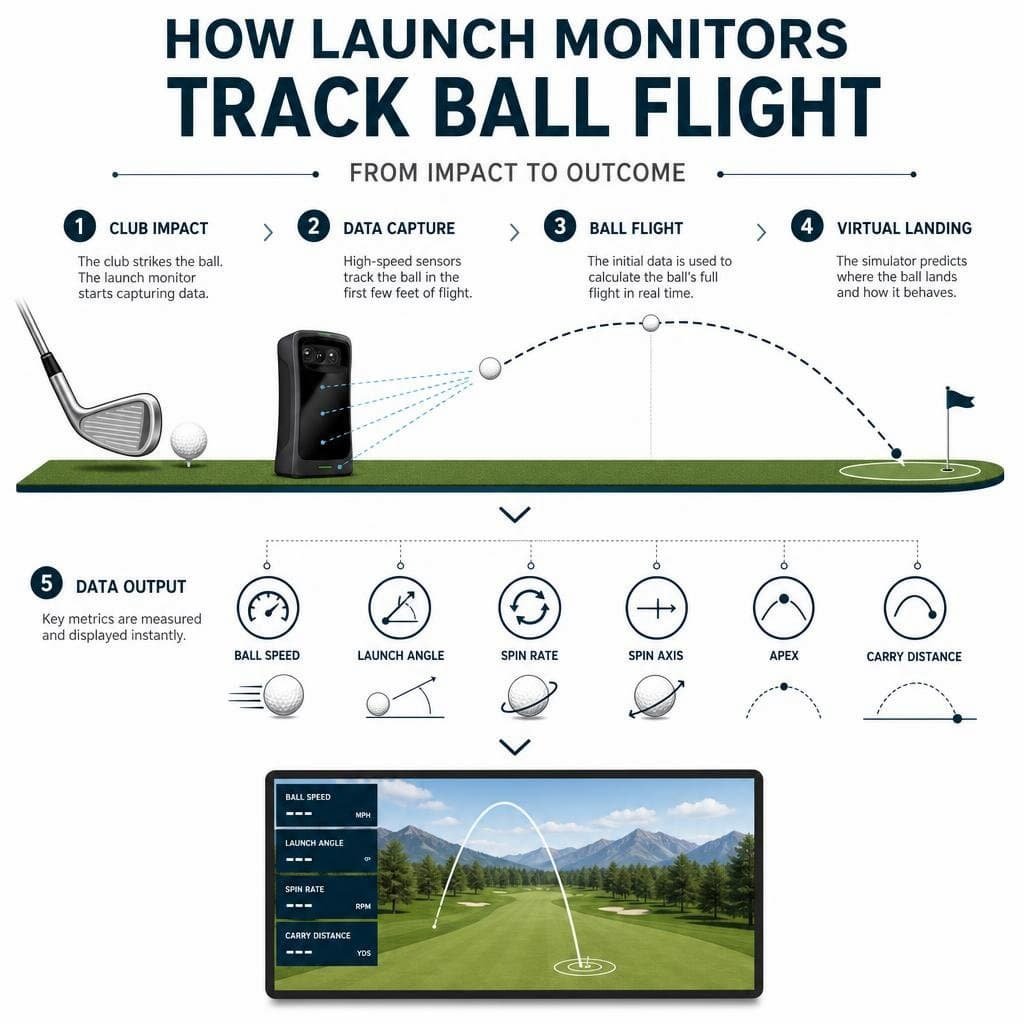
When we talk about ‘accuracy’ in golf simulators, especially concerning distance, we’re referring to how closely the simulator’s reported numbers match what would happen to the ball in a real outdoor environment under ideal conditions. It’s a nuanced concept, as simulators operate in a controlled setting, free from wind, temperature fluctuations, and varying ground conditions. Modern indoor golf simulators measure key ball data with impressive precision, often delivering data accuracy within a few percentage points of outdoor launch monitors. This level of precision is crucial for meaningful practice.
The core of simulator accuracy lies in its ability to capture the initial conditions of the golf ball immediately after impact. These initial conditions – primarily ball speed, launch angle, and spin rate – are the foundation upon which the simulator’s physics engine builds the rest of the ball’s flight.
Measured Data vs. Modeled Outcomes in Indoor Golf Training
A critical distinction to understand is the difference between measured data and modeled outcomes.
Measured Data: These are the direct observations captured by the simulator’s sensors at the moment of impact or within the first few feet of ball flight. This includes:
- Ball Speed: How fast the ball leaves the clubface.
- Launch Angle: The vertical angle at which the ball takes off.
- Spin Rate: The amount of backspin and sidespin on the ball.
- Launch Direction: The horizontal angle of the ball’s initial flight path.
These metrics are typically measured with very high fidelity by quality systems. Most high-quality simulators measure ball data within a few percentage points of outdoor launch monitors, especially for ball speed and launch angle.
Modeled Outcomes: Once the initial launch data is captured, the simulator’s software uses sophisticated physics algorithms to predict the rest of the ball’s flight path, including carry distance, apex height, and total distance. This modeling takes into account factors like gravity, air resistance, and the effect of spin on the ball’s trajectory. For instance, a golf play outcome simulation modeling system, as detailed in patents like US12397220, demonstrates the complex algorithms involved in predicting ball flight and outcomes based on initial data.
The key here is that while the initial launch data is measured, the subsequent flight and rollout are modeled. This is where environmental variables, which are absent in an indoor setting, become relevant. The simulator essentially calculates what would happen to the ball if it were flying outdoors under perfectly still, standard atmospheric conditions.
Carry Distance vs. Total Distance Accuracy
Understanding the difference between carry distance and total distance is paramount for interpreting simulator data effectively.
- Carry Distance: This is the distance the ball travels in the air from impact until it first touches the ground. It is almost entirely determined by the measured launch conditions (ball speed, launch angle, spin rate) and the simulator’s physics engine. Because it relies heavily on directly measured data and physics, carry distance is generally considered highly accurate and the most reliable metric for indoor practice.
- Total Distance: This includes the carry distance plus the distance the ball rolls after landing. The rollout portion is entirely modeled, not measured. Factors like landing angle, ground firmness, and even the type of grass would influence rollout in real life, but these are simulated based on algorithms and course conditions chosen in the software. This means that while carry distance can be exceptionally precise, total distance can vary more due to the inherent limitations of rollout algorithms trying to replicate unpredictable real-world ground conditions. For instance, using an interactive swing speed calculator can help you understand the relationship between your clubhead speed, ball speed, and how efficiently you’re transferring energy, which directly impacts carry.
For club gapping and understanding your true distances, focusing on carry distance is almost always the best approach when using a simulator. It provides a consistent baseline for how far you hit each club in the air, regardless of how the software models the subsequent bounce and roll.
How Different Club Types Perform Indoors
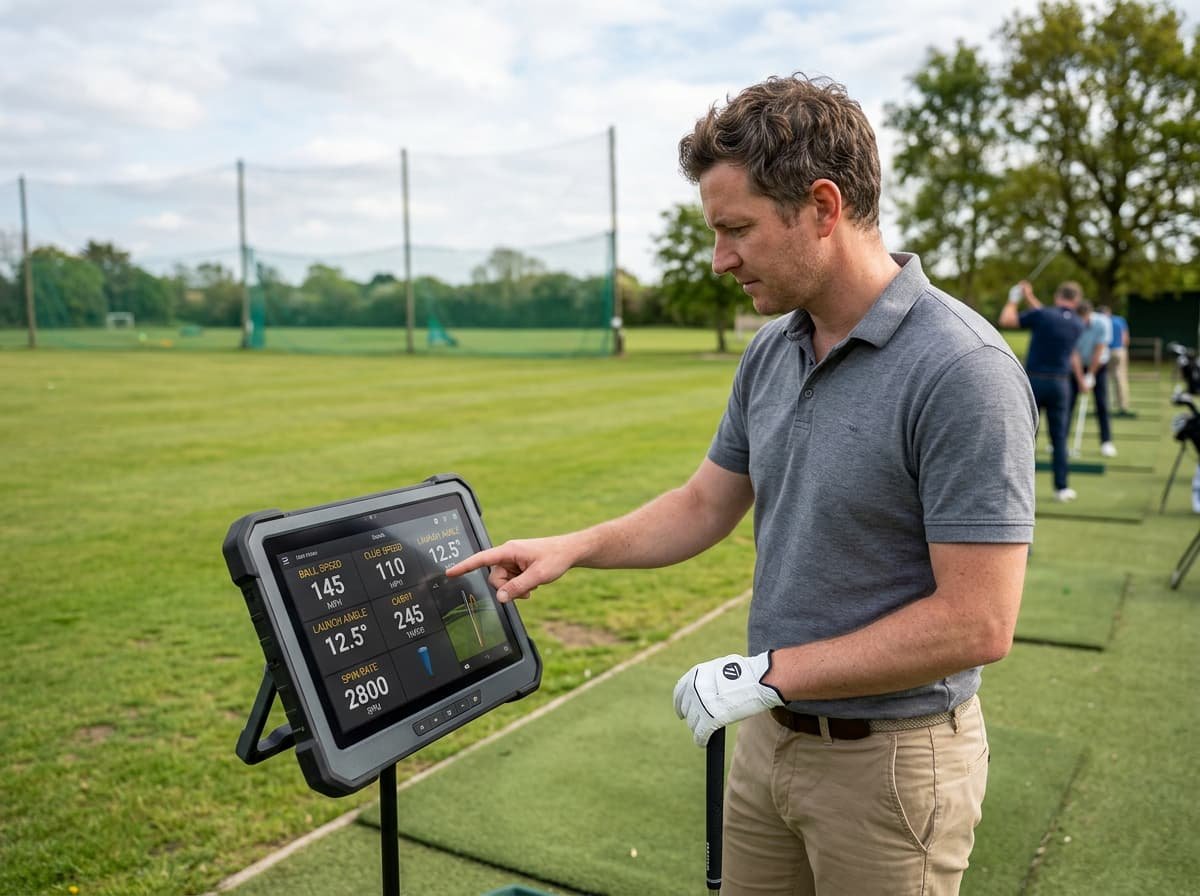
The accuracy of distance measurements in golf simulators can vary slightly depending on the club used. This isn’t necessarily a flaw in the simulator, but rather a reflection of how different clubs produce different launch conditions and how those conditions are interpreted by the system. Generally, simulators excel at capturing the data for full swings, making them highly effective for understanding your driver, fairway woods, and irons.
Driver and Fairway Wood Distance Dynamics
Drivers and fairway woods, designed for maximum distance, produce high ball speeds and lower spin rates relative to irons. Simulators are exceptionally good at measuring the high ball speeds and launch angles produced by these clubs. The challenge, and where slight variations might occur, often lies in the nuanced capture of spin.
- Clubhead Speed and Ball Speed: These are typically measured with very high accuracy, forming the backbone of distance calculations for longer clubs.
- Spin Loft and Launch Angle: Simulators effectively capture the dynamic loft and angle of attack, which determine the spin loft and, consequently, the initial launch angle and spin rate. This is crucial for maximizing driver and fairway wood distance.
- Gear Effect: While not directly measured, the simulator’s algorithms account for gear effect, which influences spin axis based on impact location on the clubface, helping to model realistic draws and fades.
The primary outcome for these clubs is carry distance, which, as discussed, is very reliable. Any perceived discrepancies often come from the modeled rollout or the “indoor swing syndrome” where golfers might unconsciously alter their swing in a confined space.
Iron and Wedge Precision in Indoor Golf Training
Irons and wedges are where simulator data can be particularly insightful for improving your game, especially for precise distance control and club gapping.
- Iron Accuracy: Simulators are excellent for irons. The predictable flight windows and the emphasis on carry distance make them ideal for dialing in your iron yardages. Golfers can hit numerous shots with each iron, observe the average carry distance, and build a reliable club gapping chart. This is a significant advantage for course management.
- Wedge Precision: For wedges, especially full swings and controlled distances, simulators provide valuable data on backspin rate and spin axis. This helps golfers understand how their technique influences the ball’s stopping power and curvature. However, short game shots like delicate chips and pitches, particularly those involving partial swings and complex turf interaction, can be more challenging for simulators to replicate perfectly. While the initial launch data for these shots is still accurate, the feel and visual feedback of how the ball interacts with different grass types and slopes are hard to replicate. Despite this, many golfers find that practicing short game on a simulator can lead to significant real-world improvements, enhancing feel and confidence. For example, some golfers have found that playing simulator golf has helped their real short game, especially with 30-50 yard shots and tight lies, by allowing them to visualize and practice more consistently.
Key Factors Influencing Simulator Distance Outcomes
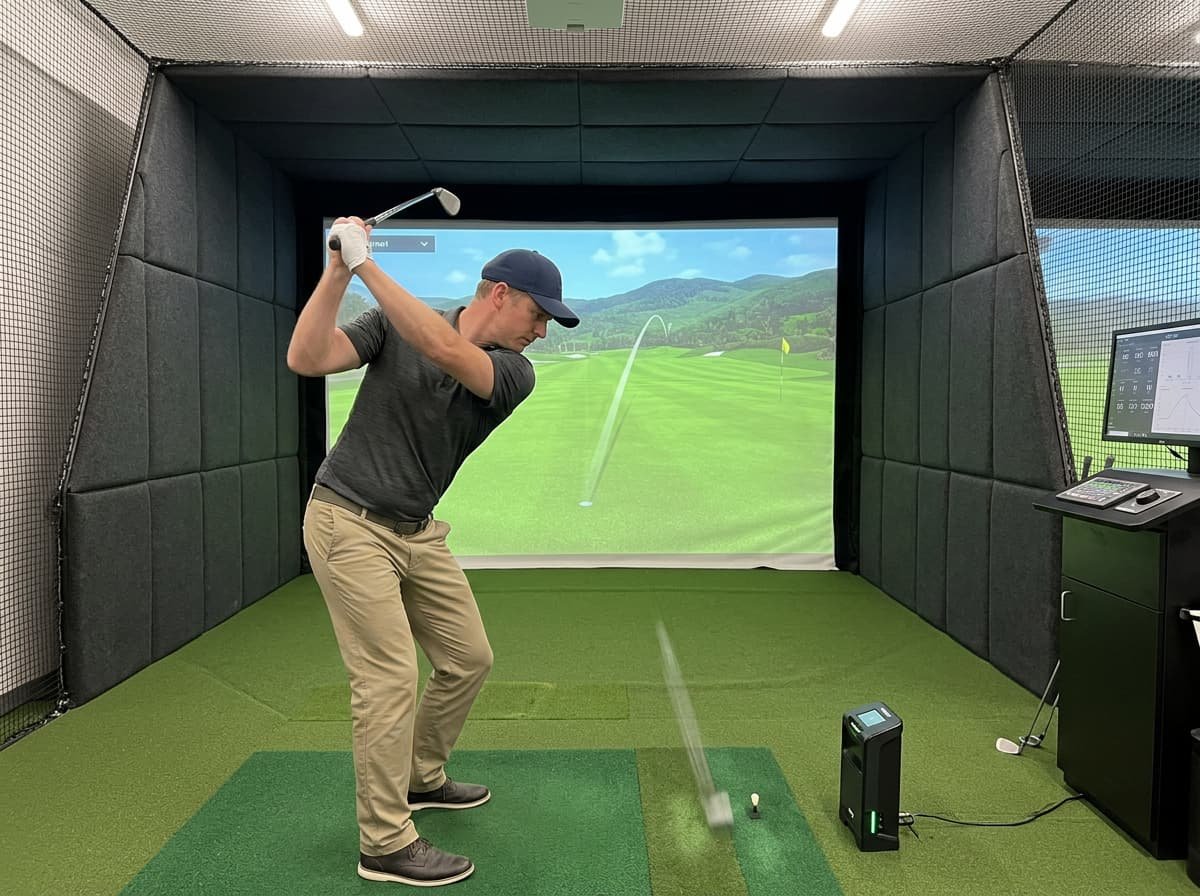
The accuracy of golf simulator distance outcomes isn’t solely dependent on the technology itself; a multitude of factors, from the type of ball you use to the environmental conditions of your setup, play a significant role. Understanding these variables is crucial for ensuring you get the most reliable data from your practice sessions.
The Impact of Ball Type and Spin Capture
The golf ball itself is a critical component in the simulator’s data capture process.
- Ball Type: Different golf balls have varying constructions, which significantly impacts spin rates and launch characteristics. Premium, multi-layer urethane balls (like those used on tour) generally provide the most realistic spin numbers in a simulator because their covers are designed to interact with the clubface in a specific way. Harder, two-piece range balls or older, scuffed balls will produce different spin rates and, consequently, different distances than a new, high-performance ball. Using a consistent, high-quality ball is essential for accurate and repeatable data. Some simulators may also require marked balls to accurately read spin.
- Spin Capture: The ability of the launch monitor to accurately capture spin is paramount. This is where different technologies can show variations. Camera-based systems often rely on markings on the ball or the texture of the ball itself to calculate spin, while radar systems track the ball’s rotation. Inaccurate spin capture can lead to significant errors in modeled carry distance, as spin is a major determinant of lift and trajectory.
- Indoor Swing Syndrome: This is a phenomenon where golfers unconsciously alter their swing in a confined indoor space, often swinging easier or making subtle adjustments to avoid hitting walls or ceilings. This can lead to slightly different clubhead speeds, launch angles, and spin rates compared to an outdoor swing, resulting in shorter or different distances.
- Selective Memory and Visual Perception: Golfers often remember their best outdoor shots and compare them to their average indoor shots. The simulator, being “brutally honest,” shows the true average, which might feel shorter than the remembered “hero” shots outdoors. The lack of visual depth perception indoors can also make distances feel different.
Environmental and Setup Variables
Beyond the ball and the golfer, the physical environment and setup of the simulator system are vital for accuracy.
- Calibration and Alignment: Proper calibration of the launch monitor and precise alignment of the hitting mat to the target line in the software are non-negotiable. Even slight misalignments can lead to inaccurate launch direction and side spin readings, affecting perceived accuracy and shot dispersion.
- Lighting: For camera-based systems, adequate and consistent lighting is crucial. Shadows, glare, or insufficient light can interfere with the cameras’ ability to accurately track the ball and club.
- Hitting Surface: The type of hitting mat can influence how the club interacts with the “ground,” especially for iron shots. A mat that is too soft or too hard can affect club path, angle of attack, and even clubhead speed slightly, which in turn impacts ball data.
- Enclosure Size and Radar Interference: For radar-based systems, the size of the enclosure and the presence of reflective surfaces can sometimes interfere with the radar signal, potentially affecting accuracy. Ensuring the setup meets the manufacturer’s specifications is important.
- Software and Rollout Algorithms: As discussed, the way the simulator’s software models rollout can vary. Different systems might use different algorithms for ground conditions, leading to variations in total distance even if carry distance is identical. This highlights the importance of understanding the specific characteristics of your chosen indoor golf lounge experience.
Understanding and controlling these variables ensures that the data you receive from your simulator is as accurate and reliable as possible, allowing for more effective practice and game improvement.
Here’s a comparison of common launch monitor technologies:
Technology Type How it Works Pros (TABLE) How it Works Description Technology Accuracy (Carry Distance) Pros — — Camera-based (e. Radar-based (e. Hybrid (e.g., Foresight GCQuad, Bushnell Launch Pro) Uses high-speed cameras to capture initial ball data (launch angle, ball speed, spin rate, direction) within the first few feet of flight. Very High Excellent for indoor use. Captures club data (path, face angle) effectively. Not affected by external factors like wind. Requires specific lighting conditions. Can be affected by ball markings or lack thereof. Generally fixed setup. Radar-based (e. TrackMan, FlightScope) Emits a radar signal and tracks the ball’s flight path over a longer distance (e.g., 6-10 feet or more) to extrapolate launch data. High Often portable and good for outdoor use as well. Can track club data. Less sensitive to lighting. Requires more space for accurate tracking. Can be affected by metallic objects or other radar signals. Hybrid (e.g., Uneekor EYE XO, SkyTrak+) Combines camera and radar technologies, or uses advanced photometric sensors with radar-like algorithms. Very High Combines the strengths of both systems, often cross-verifying data for enhanced accuracy and reliability. Can capture both ball and club data comprehensively. Can be more expensive. May still have some sensitivity to lighting or setup depending on the primary sensor type. Maximizing Real-World Outcomes with Simulator Practice
The true value of a golf simulator extends beyond simply hitting balls; it lies in its potential to translate into tangible improvements on the actual golf course. By leveraging the precise data and controlled environment, golfers can address specific weaknesses, refine their technique, and develop a more consistent game.
- Club Gapping: One of the most effective uses of a simulator is for precise club gapping. By hitting 10-15 shots with each club and recording the average carry distance, golfers can accurately determine the exact yardage for every club in their bag. This eliminates guesswork and leads to better club selection on the course.
- Dispersion Maps and Target Practice: Simulators provide immediate feedback on shot dispersion. Golfers can practice hitting to specific targets, observing where their shots land relative to the target line. This helps identify consistent miss patterns (e.g., always missing right with an iron) and allows for targeted practice to tighten dispersion.
- Pace of Play: Modern simulator software, like updates seen in TrackMan TPS 10.3, has significantly improved the pace of play, allowing golfers to complete 18 holes in under an hour for solo rounds or slightly longer for multiple players. This efficient use of time means more rounds played and more consistent practice. Many dedicated indoor golf facilities, like Tee Box virtual golf or The Back Nine Golf, offer state-of-the-art setups that facilitate this kind of focused, efficient practice.
- Data-Driven Feedback: The objective data provided by simulators removes the guesswork from practice. Instead of relying on feel alone, golfers can see the exact numbers for ball speed, launch angle, and spin, allowing them to understand the cause-and-effect relationship between their swing and the ball’s flight. This is particularly beneficial for making informed adjustments.
Translating Simulator Scores to the Course
While simulators are powerful tools, it’s important to have realistic expectations about how simulator scores translate to real-world performance.
- Perfect Lies and Ideal Conditions: Simulators inherently provide perfect lies every time, no wind, no rain, and perfectly flat putting surfaces (unless specifically programmed with breaks). This removes many of the variables and challenges present on an actual course. Consequently, simulator scores often tend to be lower than real-world scores. Statistics show that a golfer typically shooting 80-85 on the course might shoot 77-82 on a sim from similar yardages, a difference of just a few shots. However, for higher handicappers, the difference can be more significant; a standard “Sunday hack” shooting 90-110 outdoors might achieve a best round of 5 under on a simulator, representing a 20-40 shot difference.
- Course Strategy: Simulators allow golfers to play virtual versions of famous courses, offering an opportunity to learn course layouts, identify strategic landing areas, and practice specific shots. This can enhance course management skills and build confidence for when you play those courses in real life. Even professional golfers engage in simulator challenges on iconic holes, demonstrating the value of virtual practice in preparing for real-world pressure, as seen in Haotong Li’s dramatic hole-in-one challenge on TPC Sawgrass’ 17th.
- Handicap Improvement: Despite the score differences, consistent simulator practice demonstrably improves real-world golf scores. One golfer reported taking 20 strokes off their average score after using a simulator consistently. Another 3-handicap golfer found their sim scores to be very close to real scores, highlighting how simulators can improve ball striking consistency. The high volume of quality practice available indoors, especially during off-seasons, helps ingrain proper mechanics and build muscle memory that translates to the course.
Frequently Asked Questions About Simulator Accuracy
We often hear common questions and concerns from golfers about the accuracy and utility of golf simulators. Let’s address some of these directly.
Why do my simulator distances feel shorter than on the golf course?
This is a very common perception, and it’s usually due to a combination of factors:
- Indoor Swing Syndrome: As mentioned, golfers can unconsciously restrict their swing indoors, leading to slightly lower clubhead speeds and less efficient strikes.
- Real-World Variables: On the course, you might benefit from tailwinds, firm ground for extra roll, or downhill slopes. Simulators typically model neutral conditions.
- Elevation Effects: Some courses are at higher altitudes, where the ball travels further due to thinner air. Simulators default to sea-level conditions unless adjusted.
- Average vs. Best Shot: Outdoors, we tend to remember our best, flushed shots. Simulators, however, provide data for every shot, including mishits, giving you a more honest average. Your true average carry distance on the simulator might indeed be shorter than your remembered “best” outdoor distance.
How accurate are simulators for short game and putting?
This is often the area where simulators face the most scrutiny, and for good reason:
- Depth Perception: The lack of true depth perception indoors makes judging delicate chip shots and pitches incredibly difficult. It’s hard to replicate the “feel” of how much loft and power is needed for a specific short game shot.
- Chip Shots: While launch monitors capture the initial data for chips accurately, the interaction with the hitting mat versus real grass, and the subsequent rollout modeling, can feel different. Some golfers find that excessive indoor chipping can even negatively affect their real short game feel.
- Putting Speed and Breaks: Simulators can be excellent for practicing putting speed control if you use full-length putts. However, reading breaks on a flat screen can be challenging, and many golfers opt for “gimme” settings (e.g., putts within 4-8 feet are automatically holed) to speed up gameplay. While some advanced systems offer realistic green contours, the visual feedback and feel are still distinct from real grass.
Despite these nuances, practicing the mechanics of chipping and putting, especially focusing on consistent strike and swing length for specific distances, can still be beneficial.
Can beginners rely on simulator data to improve?
Absolutely. Simulators are incredibly valuable tools for beginners for several reasons:
- Instant Feedback: Beginners get immediate, objective data on every swing. This helps them understand the impact of their swing mechanics on the ball’s flight.
- Consistency: The controlled environment allows beginners to focus purely on their swing without external distractions or environmental variables. This helps in developing consistent contact and repeatable motions.
- Muscle Memory: The ability to hit a high volume of balls and receive instant feedback helps beginners build proper muscle memory faster. They can quickly identify and correct flaws.
- Reduced Intimidation: For many beginners, the golf course can be intimidating. Simulators offer a low-pressure environment to learn the fundamentals and build confidence before stepping onto the real course.
While a beginner might not immediately translate simulator scores into identical outdoor scores, the fundamental improvements in swing mechanics, ball striking, and understanding of ball flight will undoubtedly lead to faster progress and lower scores on the course over time.
Conclusion
The evolution of golf simulator technology has transformed indoor golf from a novelty into a sophisticated training and entertainment platform. By understanding the intricacies of “golf simulator outcome,” we can harness the power of these systems to genuinely elevate our game.
We’ve learned that accuracy, particularly for carry distance, is remarkably high in modern simulators, providing a reliable foundation for club gapping and swing analysis. Distinguishing between measured data and modeled outcomes helps us interpret the numbers correctly, focusing on the highly accurate launch conditions. While factors like ball type, setup, and even our own “indoor swing syndrome” can influence results, being aware of these variables allows us to optimize our practice environment for consistency and precision.
Golf simulators offer an unparalleled opportunity for year-round practice, data-driven improvement, and strategic course preparation. Whether you’re a seasoned pro refining your spin axis or a beginner learning the basics of ball striking, the insights gained from a quality simulator are invaluable. By embracing this technology and understanding its nuances, golfers can confidently translate their indoor improvements into lower scores and a more enjoyable experience on the green fairways.
Key Factors Influencing Simulator Distance Outcomes
The accuracy of golf simulator distance outcomes isn’t solely dependent on the technology itself; a multitude of factors, from the type of ball you use to the environmental conditions of your setup, play a significant role. Understanding these variables is crucial for ensuring you get the most reliable data from your practice sessions.
The Impact of Ball Type and Spin Capture
The golf ball itself is a critical component in the simulator’s data capture process.
- Ball Type: Different golf balls have varying constructions, which significantly impacts spin rates and launch characteristics. Premium, multi-layer urethane balls (like those used on tour) generally provide the most realistic spin numbers in a simulator because their covers are designed to interact with the clubface in a specific way. Harder, two-piece range balls or older, scuffed balls will produce different spin rates and, consequently, different distances than a new, high-performance ball. Using a consistent, high-quality ball is essential for accurate and repeatable data. Some simulators may also require marked balls to accurately read spin.
- Spin Capture: The ability of the launch monitor to accurately capture spin is paramount. This is where different technologies can show variations. Camera-based systems often rely on markings on the ball or the texture of the ball itself to calculate spin, while radar systems track the ball’s rotation. Inaccurate spin capture can lead to significant errors in modeled carry distance, as spin is a major determinant of lift and trajectory.
- Indoor Swing Syndrome: This is a phenomenon where golfers unconsciously alter their swing in a confined indoor space, often swinging easier or making subtle adjustments to avoid hitting walls or ceilings. This can lead to slightly different clubhead speeds, launch angles, and spin rates compared to an outdoor swing, resulting in shorter or different distances.
- Selective Memory and Visual Perception: Golfers often remember their best outdoor shots and compare them to their average indoor shots. The simulator, being “brutally honest,” shows the true average, which might feel shorter than the remembered “hero” shots outdoors. The lack of visual depth perception indoors can also make distances feel different.
Environmental and Setup Variables
Beyond the ball and the golfer, the physical environment and setup of the simulator system are vital for accuracy.
- Calibration and Alignment: Proper calibration of the launch monitor and precise alignment of the hitting mat to the target line in the software are non-negotiable. Even slight misalignments can lead to inaccurate launch direction and side spin readings, affecting perceived accuracy and shot dispersion.
- Lighting: For camera-based systems, adequate and consistent lighting is crucial. Shadows, glare, or insufficient light can interfere with the cameras’ ability to accurately track the ball and club.
- Hitting Surface: The type of hitting mat can influence how the club interacts with the “ground,” especially for iron shots. A mat that is too soft or too hard can affect club path, angle of attack, and even clubhead speed slightly, which in turn impacts ball data.
- Enclosure Size and Radar Interference: For radar-based systems, the size of the enclosure and the presence of reflective surfaces can sometimes interfere with the radar signal, potentially affecting accuracy. Ensuring the setup meets the manufacturer’s specifications is important.
- Software and Rollout Algorithms: As discussed, the way the simulator’s software models rollout can vary. Different systems might use different algorithms for ground conditions, leading to variations in total distance even if carry distance is identical. This highlights the importance of understanding the specific characteristics of your chosen indoor golf lounge experience.
Understanding and controlling these variables ensures that the data you receive from your simulator is as accurate and reliable as possible, allowing for more effective practice and game improvement.
Here’s a comparison of common launch monitor technologies:
Technology Type How it Works Pros (TABLE) How it Works Description Technology Accuracy (Carry Distance) Pros — — Camera-based (e. Radar-based (e. Hybrid (e.g., Foresight GCQuad, Bushnell Launch Pro) Uses high-speed cameras to capture initial ball data (launch angle, ball speed, spin rate, direction) within the first few feet of flight. Very High Excellent for indoor use. Captures club data (path, face angle) effectively. Not affected by external factors like wind. Requires specific lighting conditions. Can be affected by ball markings or lack thereof. Generally fixed setup. Radar-based (e. TrackMan, FlightScope) Emits a radar signal and tracks the ball’s flight path over a longer distance (e.g., 6-10 feet or more) to extrapolate launch data. High Often portable and good for outdoor use as well. Can track club data. Less sensitive to lighting. Requires more space for accurate tracking. Can be affected by metallic objects or other radar signals. Hybrid (e.g., Uneekor EYE XO, SkyTrak+) Combines camera and radar technologies, or uses advanced photometric sensors with radar-like algorithms. Very High Combines the strengths of both systems, often cross-verifying data for enhanced accuracy and reliability. Can capture both ball and club data comprehensively. Can be more expensive. May still have some sensitivity to lighting or setup depending on the primary sensor type. Maximizing Real-World Outcomes with Simulator Practice
The true value of a golf simulator extends beyond simply hitting balls; it lies in its potential to translate into tangible improvements on the actual golf course. By leveraging the precise data and controlled environment, golfers can address specific weaknesses, refine their technique, and develop a more consistent game.
- Club Gapping: One of the most effective uses of a simulator is for precise club gapping. By hitting 10-15 shots with each club and recording the average carry distance, golfers can accurately determine the exact yardage for every club in their bag. This eliminates guesswork and leads to better club selection on the course.
- Dispersion Maps and Target Practice: Simulators provide immediate feedback on shot dispersion. Golfers can practice hitting to specific targets, observing where their shots land relative to the target line. This helps identify consistent miss patterns (e.g., always missing right with an iron) and allows for targeted practice to tighten dispersion.
- Pace of Play: Modern simulator software, like updates seen in TrackMan TPS 10.3, has significantly improved the pace of play, allowing golfers to complete 18 holes in under an hour for solo rounds or slightly longer for multiple players. This efficient use of time means more rounds played and more consistent practice. Many dedicated indoor golf facilities, like Tee Box virtual golf or The Back Nine Golf, offer state-of-the-art setups that facilitate this kind of focused, efficient practice.
- Data-Driven Feedback: The objective data provided by simulators removes the guesswork from practice. Instead of relying on feel alone, golfers can see the exact numbers for ball speed, launch angle, and spin, allowing them to understand the cause-and-effect relationship between their swing and the ball’s flight. This is particularly beneficial for making informed adjustments.
Translating Simulator Scores to the Course
While simulators are powerful tools, it’s important to have realistic expectations about how simulator scores translate to real-world performance.
- Perfect Lies and Ideal Conditions: Simulators inherently provide perfect lies every time, no wind, no rain, and perfectly flat putting surfaces (unless specifically programmed with breaks). This removes many of the variables and challenges present on an actual course. Consequently, simulator scores often tend to be lower than real-world scores. Statistics show that a golfer typically shooting 80-85 on the course might shoot 77-82 on a sim from similar yardages, a difference of just a few shots. However, for higher handicappers, the difference can be more significant; a standard “Sunday hack” shooting 90-110 outdoors might achieve a best round of 5 under on a simulator, representing a 20-40 shot difference.
- Course Strategy: Simulators allow golfers to play virtual versions of famous courses, offering an opportunity to learn course layouts, identify strategic landing areas, and practice specific shots. This can enhance course management skills and build confidence for when you play those courses in real life. Even professional golfers engage in simulator challenges on iconic holes, demonstrating the value of virtual practice in preparing for real-world pressure, as seen in Haotong Li’s dramatic hole-in-one challenge on TPC Sawgrass’ 17th.
- Handicap Improvement: Despite the score differences, consistent simulator practice demonstrably improves real-world golf scores. One golfer reported taking 20 strokes off their average score after using a simulator consistently. Another 3-handicap golfer found their sim scores to be very close to real scores, highlighting how simulators can improve ball striking consistency. The high volume of quality practice available indoors, especially during off-seasons, helps ingrain proper mechanics and build muscle memory that translates to the course.
Frequently Asked Questions About Simulator Accuracy
We often hear common questions and concerns from golfers about the accuracy and utility of golf simulators. Let’s address some of these directly.
Why do my simulator distances feel shorter than on the golf course?
This is a very common perception, and it’s usually due to a combination of factors:
- Indoor Swing Syndrome: As mentioned, golfers can unconsciously restrict their swing indoors, leading to slightly lower clubhead speeds and less efficient strikes.
- Real-World Variables: On the course, you might benefit from tailwinds, firm ground for extra roll, or downhill slopes. Simulators typically model neutral conditions.
- Elevation Effects: Some courses are at higher altitudes, where the ball travels further due to thinner air. Simulators default to sea-level conditions unless adjusted.
- Average vs. Best Shot: Outdoors, we tend to remember our best, flushed shots. Simulators, however, provide data for every shot, including mishits, giving you a more honest average. Your true average carry distance on the simulator might indeed be shorter than your remembered “best” outdoor distance.
How accurate are simulators for short game and putting?
This is often the area where simulators face the most scrutiny, and for good reason:
- Depth Perception: The lack of true depth perception indoors makes judging delicate chip shots and pitches incredibly difficult. It’s hard to replicate the “feel” of how much loft and power is needed for a specific short game shot.
- Chip Shots: While launch monitors capture the initial data for chips accurately, the interaction with the hitting mat versus real grass, and the subsequent rollout modeling, can feel different. Some golfers find that excessive indoor chipping can even negatively affect their real short game feel.
- Putting Speed and Breaks: Simulators can be excellent for practicing putting speed control if you use full-length putts. However, reading breaks on a flat screen can be challenging, and many golfers opt for “gimme” settings (e.g., putts within 4-8 feet are automatically holed) to speed up gameplay. While some advanced systems offer realistic green contours, the visual feedback and feel are still distinct from real grass.
Despite these nuances, practicing the mechanics of chipping and putting, especially focusing on consistent strike and swing length for specific distances, can still be beneficial.
Can beginners rely on simulator data to improve?
Absolutely. Simulators are incredibly valuable tools for beginners for several reasons:
- Instant Feedback: Beginners get immediate, objective data on every swing. This helps them understand the impact of their swing mechanics on the ball’s flight.
- Consistency: The controlled environment allows beginners to focus purely on their swing without external distractions or environmental variables. This helps in developing consistent contact and repeatable motions.
- Muscle Memory: The ability to hit a high volume of balls and receive instant feedback helps beginners build proper muscle memory faster. They can quickly identify and correct flaws.
- Reduced Intimidation: For many beginners, the golf course can be intimidating. Simulators offer a low-pressure environment to learn the fundamentals and build confidence before stepping onto the real course.
While a beginner might not immediately translate simulator scores into identical outdoor scores, the fundamental improvements in swing mechanics, ball striking, and understanding of ball flight will undoubtedly lead to faster progress and lower scores on the course over time.
Conclusion
The evolution of golf simulator technology has transformed indoor golf from a novelty into a sophisticated training and entertainment platform. By understanding the intricacies of “golf simulator outcome,” we can harness the power of these systems to genuinely elevate our game.
We’ve learned that accuracy, particularly for carry distance, is remarkably high in modern simulators, providing a reliable foundation for club gapping and swing analysis. Distinguishing between measured data and modeled outcomes helps us interpret the numbers correctly, focusing on the highly accurate launch conditions. While factors like ball type, setup, and even our own “indoor swing syndrome” can influence results, being aware of these variables allows us to optimize our practice environment for consistency and precision.
Golf simulators offer an unparalleled opportunity for year-round practice, data-driven improvement, and strategic course preparation. Whether you’re a seasoned pro refining your spin axis or a beginner learning the basics of ball striking, the insights gained from a quality simulator are invaluable. By embracing this technology and understanding its nuances, golfers can confidently translate their indoor improvements into lower scores and a more enjoyable experience on the green fairways.
Key Factors Influencing Simulator Distance Outcomes
The accuracy of golf simulator distance outcomes isn’t solely dependent on the technology itself; a multitude of factors, from the type of ball you use to the environmental conditions of your setup, play a significant role. Understanding these variables is crucial for ensuring you get the most reliable data from your practice sessions.
The Impact of Ball Type and Spin Capture
The golf ball itself is a critical component in the simulator’s data capture process.
- Ball Type: Different golf balls have varying constructions, which significantly impacts spin rates and launch characteristics. Premium, multi-layer urethane balls (like those used on tour) generally provide the most realistic spin numbers in a simulator because their covers are designed to interact with the clubface in a specific way. Harder, two-piece range balls or older, scuffed balls will produce different spin rates and, consequently, different distances than a new, high-performance ball. Using a consistent, high-quality ball is essential for accurate and repeatable data. Some simulators may also require marked balls to accurately read spin.
- Spin Capture: The ability of the launch monitor to accurately capture spin is paramount. This is where different technologies can show variations. Camera-based systems often rely on markings on the ball or the texture of the ball itself to calculate spin, while radar systems track the ball’s rotation. Inaccurate spin capture can lead to significant errors in modeled carry distance, as spin is a major determinant of lift and trajectory.
- Indoor Swing Syndrome: This is a phenomenon where golfers unconsciously alter their swing in a confined indoor space, often swinging easier or making subtle adjustments to avoid hitting walls or ceilings. This can lead to slightly different clubhead speeds, launch angles, and spin rates compared to an outdoor swing, resulting in shorter or different distances.
- Selective Memory and Visual Perception: Golfers often remember their best outdoor shots and compare them to their average indoor shots. The simulator, being “brutally honest,” shows the true average, which might feel shorter than the remembered “hero” shots outdoors. The lack of visual depth perception indoors can also make distances feel different.
Environmental and Setup Variables
Beyond the ball and the golfer, the physical environment and setup of the simulator system are vital for accuracy.
- Calibration and Alignment: Proper calibration of the launch monitor and precise alignment of the hitting mat to the target line in the software are non-negotiable. Even slight misalignments can lead to inaccurate launch direction and side spin readings, affecting perceived accuracy and shot dispersion.
- Lighting: For camera-based systems, adequate and consistent lighting is crucial. Shadows, glare, or insufficient light can interfere with the cameras’ ability to accurately track the ball and club.
- Hitting Surface: The type of hitting mat can influence how the club interacts with the “ground,” especially for iron shots. A mat that is too soft or too hard can affect club path, angle of attack, and even clubhead speed slightly, which in turn impacts ball data.
- Enclosure Size and Radar Interference: For radar-based systems, the size of the enclosure and the presence of reflective surfaces can sometimes interfere with the radar signal, potentially affecting accuracy. Ensuring the setup meets the manufacturer’s specifications is important.
- Software and Rollout Algorithms: As discussed, the way the simulator’s software models rollout can vary. Different systems might use different algorithms for ground conditions, leading to variations in total distance even if carry distance is identical. This highlights the importance of understanding the specific characteristics of your chosen indoor golf lounge experience.
Understanding and controlling these variables ensures that the data you receive from your simulator is as accurate and reliable as possible, allowing for more effective practice and game improvement.
Here’s a comparison of common launch monitor technologies:
Technology Type How it Works Pros (TABLE) How it Works Description Technology Accuracy (Carry Distance) Pros — — Camera-based (e. Radar-based (e. Hybrid (e.g., Foresight GCQuad, Bushnell Launch Pro) Uses high-speed cameras to capture initial ball data (launch angle, ball speed, spin rate, direction) within the first few feet of flight. Very High Excellent for indoor use. Captures club data (path, face angle) effectively. Not affected by external factors like wind. Requires specific lighting conditions. Can be affected by ball markings or lack thereof. Generally fixed setup. Radar-based (e. TrackMan, FlightScope) Emits a radar signal and tracks the ball’s flight path over a longer distance (e.g., 6-10 feet or more) to extrapolate launch data. High Often portable and good for outdoor use as well. Can track club data. Less sensitive to lighting. Requires more space for accurate tracking. Can be affected by metallic objects or other radar signals. Hybrid (e.g., Uneekor EYE XO, SkyTrak+) Combines camera and radar technologies, or uses advanced photometric sensors with radar-like algorithms. Very High Combines the strengths of both systems, often cross-verifying data for enhanced accuracy and reliability. Can capture both ball and club data comprehensively. Can be more expensive. May still have some sensitivity to lighting or setup depending on the primary sensor type. Maximizing Real-World Outcomes with Simulator Practice
The true value of a golf simulator extends beyond simply hitting balls; it lies in its potential to translate into tangible improvements on the actual golf course. By leveraging the precise data and controlled environment, golfers can address specific weaknesses, refine their technique, and develop a more consistent game.
- Club Gapping: One of the most effective uses of a simulator is for precise club gapping. By hitting 10-15 shots with each club and recording the average carry distance, golfers can accurately determine the exact yardage for every club in their bag. This eliminates guesswork and leads to better club selection on the course.
- Dispersion Maps and Target Practice: Simulators provide immediate feedback on shot dispersion. Golfers can practice hitting to specific targets, observing where their shots land relative to the target line. This helps identify consistent miss patterns (e.g., always missing right with an iron) and allows for targeted practice to tighten dispersion.
- Pace of Play: Modern simulator software, like updates seen in TrackMan TPS 10.3, has significantly improved the pace of play, allowing golfers to complete 18 holes in under an hour for solo rounds or slightly longer for multiple players. This efficient use of time means more rounds played and more consistent practice. Many dedicated indoor golf facilities, like Tee Box virtual golf or The Back Nine Golf, offer state-of-the-art setups that facilitate this kind of focused, efficient practice.
- Data-Driven Feedback: The objective data provided by simulators removes the guesswork from practice. Instead of relying on feel alone, golfers can see the exact numbers for ball speed, launch angle, and spin, allowing them to understand the cause-and-effect relationship between their swing and the ball’s flight. This is particularly beneficial for making informed adjustments.
Translating Simulator Scores to the Course
While simulators are powerful tools, it’s important to have realistic expectations about how simulator scores translate to real-world performance.
- Perfect Lies and Ideal Conditions: Simulators inherently provide perfect lies every time, no wind, no rain, and perfectly flat putting surfaces (unless specifically programmed with breaks). This removes many of the variables and challenges present on an actual course. Consequently, simulator scores often tend to be lower than real-world scores. Statistics show that a golfer typically shooting 80-85 on the course might shoot 77-82 on a sim from similar yardages, a difference of just a few shots. However, for higher handicappers, the difference can be more significant; a standard “Sunday hack” shooting 90-110 outdoors might achieve a best round of 5 under on a simulator, representing a 20-40 shot difference.
- Course Strategy: Simulators allow golfers to play virtual versions of famous courses, offering an opportunity to learn course layouts, identify strategic landing areas, and practice specific shots. This can enhance course management skills and build confidence for when you play those courses in real life. Even professional golfers engage in simulator challenges on iconic holes, demonstrating the value of virtual practice in preparing for real-world pressure, as seen in Haotong Li’s dramatic hole-in-one challenge on TPC Sawgrass’ 17th.
- Handicap Improvement: Despite the score differences, consistent simulator practice demonstrably improves real-world golf scores. One golfer reported taking 20 strokes off their average score after using a simulator consistently. Another 3-handicap golfer found their sim scores to be very close to real scores, highlighting how simulators can improve ball striking consistency. The high volume of quality practice available indoors, especially during off-seasons, helps ingrain proper mechanics and build muscle memory that translates to the course.
Frequently Asked Questions About Simulator Accuracy
We often hear common questions and concerns from golfers about the accuracy and utility of golf simulators. Let’s address some of these directly.
Why do my simulator distances feel shorter than on the golf course?
This is a very common perception, and it’s usually due to a combination of factors:
- Indoor Swing Syndrome: As mentioned, golfers can unconsciously restrict their swing indoors, leading to slightly lower clubhead speeds and less efficient strikes.
- Real-World Variables: On the course, you might benefit from tailwinds, firm ground for extra roll, or downhill slopes. Simulators typically model neutral conditions.
- Elevation Effects: Some courses are at higher altitudes, where the ball travels further due to thinner air. Simulators default to sea-level conditions unless adjusted.
- Average vs. Best Shot: Outdoors, we tend to remember our best, flushed shots. Simulators, however, provide data for every shot, including mishits, giving you a more honest average. Your true average carry distance on the simulator might indeed be shorter than your remembered “best” outdoor distance.
How accurate are simulators for short game and putting?
This is often the area where simulators face the most scrutiny, and for good reason:
- Depth Perception: The lack of true depth perception indoors makes judging delicate chip shots and pitches incredibly difficult. It’s hard to replicate the “feel” of how much loft and power is needed for a specific short game shot.
- Chip Shots: While launch monitors capture the initial data for chips accurately, the interaction with the hitting mat versus real grass, and the subsequent rollout modeling, can feel different. Some golfers find that excessive indoor chipping can even negatively affect their real short game feel.
- Putting Speed and Breaks: Simulators can be excellent for practicing putting speed control if you use full-length putts. However, reading breaks on a flat screen can be challenging, and many golfers opt for “gimme” settings (e.g., putts within 4-8 feet are automatically holed) to speed up gameplay. While some advanced systems offer realistic green contours, the visual feedback and feel are still distinct from real grass.
Despite these nuances, practicing the mechanics of chipping and putting, especially focusing on consistent strike and swing length for specific distances, can still be beneficial.
Can beginners rely on simulator data to improve?
Absolutely. Simulators are incredibly valuable tools for beginners for several reasons:
- Instant Feedback: Beginners get immediate, objective data on every swing. This helps them understand the impact of their swing mechanics on the ball’s flight.
- Consistency: The controlled environment allows beginners to focus purely on their swing without external distractions or environmental variables. This helps in developing consistent contact and repeatable motions.
- Muscle Memory: The ability to hit a high volume of balls and receive instant feedback helps beginners build proper muscle memory faster. They can quickly identify and correct flaws.
- Reduced Intimidation: For many beginners, the golf course can be intimidating. Simulators offer a low-pressure environment to learn the fundamentals and build confidence before stepping onto the real course.
While a beginner might not immediately translate simulator scores into identical outdoor scores, the fundamental improvements in swing mechanics, ball striking, and understanding of ball flight will undoubtedly lead to faster progress and lower scores on the course over time.
Conclusion
The evolution of golf simulator technology has transformed indoor golf from a novelty into a sophisticated training and entertainment platform. By understanding the intricacies of “golf simulator outcome,” we can harness the power of these systems to genuinely elevate our game.
We’ve learned that accuracy, particularly for carry distance, is remarkably high in modern simulators, providing a reliable foundation for club gapping and swing analysis. Distinguishing between measured data and modeled outcomes helps us interpret the numbers correctly, focusing on the highly accurate launch conditions. While factors like ball type, setup, and even our own “indoor swing syndrome” can influence results, being aware of these variables allows us to optimize our practice environment for consistency and precision.
Golf simulators offer an unparalleled opportunity for year-round practice, data-driven improvement, and strategic course preparation. Whether you’re a seasoned pro refining your spin axis or a beginner learning the basics of ball striking, the insights gained from a quality simulator are invaluable. By embracing this technology and understanding its nuances, golfers can confidently translate their indoor improvements into lower scores and a more enjoyable experience on the green fairways.